Buy anything from 5,000+ international stores. One checkout price. No surprise fees. Join 2M+ shoppers on Desertcart.
Desertcart purchases this item on your behalf and handles shipping, customs, and support to USA.
๐ผ Secure, stylish, and spacious โ your dataโs new best friend.
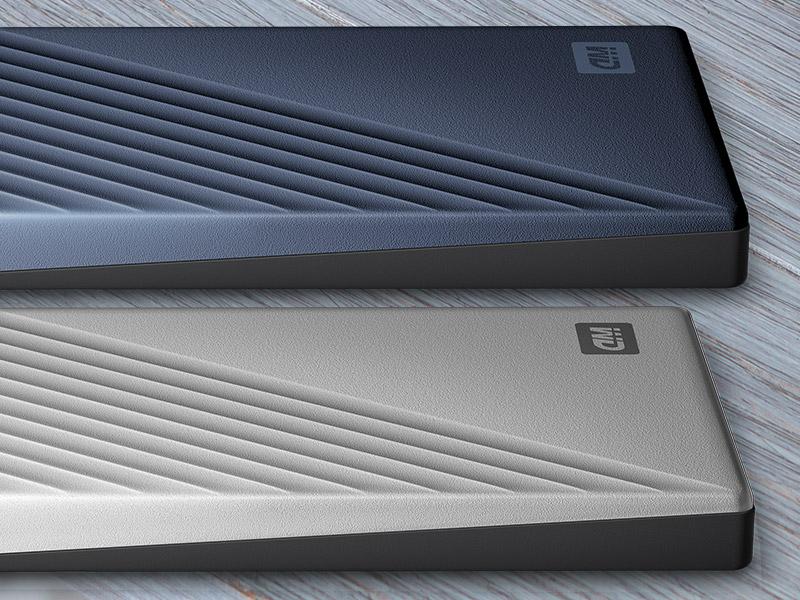
The WD 5TB My Passport Ultra is a portable external hard drive featuring a sleek metal design, massive 5TB storage capacity, and advanced 256-bit AES hardware encryption for robust data protection. Equipped with USB-C and USB 3.1 connectivity, it offers fast, seamless transfers and is pre-formatted for Windows 10 for immediate use. Backed by a 3-year limited warranty, itโs designed for professionals seeking reliable, stylish, and secure portable storage.


| ASIN | B07X46C64N |
| Additional Features | Hardware Encryption, Portable |
| Best Sellers Rank | #40 in External Hard Drives |
| Brand | WD |
| Built-In Media | Portable hard drive, Quick Start Guide, USB 3.0 cable |
| Cache Memory Installed Size | 5 |
| Color | Blue |
| Compatible Devices | PC |
| Connectivity Technology | USB |
| Customer Package Type | FFP (Flat Free Package) |
| Customer Reviews | 4.5 out of 5 stars 5,160 Reviews |
| Data Transfer Rate | 2.5 Megabytes Per Second |
| Digital Storage Capacity | 5 TB |
| Enclosure Material | Metal |
| Form Factor | 2.5-inch |
| Global Trade Identification Number | 00718037871790 |
| Hard Disk Description | Mechanical Hard Disk |
| Hard Disk Form Factor | 2.5 Inches |
| Hard Disk Interface | USB 3.1 |
| Hard Disk Rotational Speed | 1 RPM |
| Hard-Drive Size | 5 TB |
| Hardware Connectivity | USB 3.0, USB Type C |
| Hardware Platform | Mac, PC |
| Installation Type | External Hard Drive |
| Item Dimensions L x W x Thickness | 4.33"L x 3.21"W x 0.83"Th |
| Item Type Name | HDD |
| Item Weight | 4.64 ounces |
| Manufacturer | Western Digital Technologies, Inc. |
| Media Speed | โค 625 MB/s |
| Mfr Part Number | WDBFTM0050BBL-WESN |
| Model Name | My Passport Ultra |
| Model Number | WDBFTM0050BBL-WESN |
| Number of Items | 1 |
| Special Feature | Hardware Encryption , Portable |
| Specific Uses For Product | business, personal |
| UPC | 718037871790 |
| Unit Count | 1.0 Count |
| Warranty Description | 3-year limited warranty |
T**X
WD 5 TB My Passport Ultra Blue Potable External Drive
I canโt complain about this hard drive at all itโs portable, easy installation, does get hot after being plugged in all day I got 5 TB so storage is unbelievable. It doesnโt make loud noise or any I hear at all and it fits perfectly you can use the c port or use connector that comes with it .
R**M
5T storage devide works well with Linux Fedora-33 and Rocky-8
This product is used to store large data files on both Fedora-33 and Rocky-8 linux systems. They are moved between the two systems allowing machine based access. The NTFS file system just needed to be configured in /etc/fstab, the blkid gave the device location, and then the mount command allowed access to the device so that it acted like any other. They are inexpensive enough that three devices are now attached to the same linux box giving multiple terrabytes of storage. The USB-C connection with adapter gives a quick change between the USB ports of the Rocky Linux USB-A 3.0 ports and the fedora-33 USB-C ports, allowing portable connection to each computer. Access speeds seem higher with the 5T USB-C than with the USB-A devices (e.g. the non Ultra version of the 5T drive). I keep the cable attached to the device at all times. Experience with others has taught me that the connection to the device is direct to the circuit board, so this procedure keeps the connects to a minimum. I do not tug or flex the attaching cables. Three are operated horizontally and one is operated vertically. There does not seem to be any difference in performance between vertical or horizontal operation. Longevity - I have both the 1T and 4T versions which I purchased almost 10 years ago which I use to store pictures (1T) and data files (4T). I started purchasing 5T drives in 2017 and 2018, and again in 2022. All but the 1T device are continually used daily and have had no issues.
B**R
Very fast transfer rates, short cable
Love this little drive. Very happy that USB-C is starting to appear as an option on portable hard drives. I have owned the old style metallic Passport 5TB and the WD Elements 5TB and for me this is the best one yet. The good: - Huge 5TB capacity in a pretty small footprint. This drive is about the same size as the older Passport and Elements drives. The blue color makes it look a little slimmer. - USB-C to USB-C transfer rates steadily above 130MB/s for large files. - The USB-C cable includes a compact USB-A adapter so you can still use this with older computer ports giving full flexibility. - Comes bundled with a very slim software installer for PC and Mac. I don't use the software but generally save it somewhere in case I need it before formatting the drive. Older passport used to include upwards of 500MBs of this software but these new installers are only a few MBs. The not as good. - The included cord is pretty short, It would be nice to have a little bit longer. - The drive is no smaller than previous generations. I guess this is as small as spinning 5TB drives are going to get, now that SSD prices are coming down. Can't wait to get a 5TB SSD in this price range! - The price is generally 10-30% higher than the older Passport. I don't know that the USB-C interface and faster transfers justify the higher end of that pricing. I can't comment on longevity as I've only used the drive for a week, but so far it is fast, quiet and stable. I've always found WD drives to be reliable, but I never keep a drive in service longer than 2 years and always have a backup. I hope this one will be as reliable as my past WDs.
A**R
Longevity
It worked well for 4 years (since 2022) and now just got corrupted (won't unmount, failing drive test in WD Drive utilities, Mac first aid won't work). Trying to get all the files off of it before it croaks completely.
H**.
Excellent Hard Drive
You get what you asked for and it works flawlessly
P**I
Super for Backing Up your Files
Most of us need to be better about backing up our files. This external drive came highly recommended by a respectable tech reviewer. And it hasn't let me down. This 5T Passport can hold a lot of data and files, including earlier versions. I found the setup to be quick and easy with my MacBook. In a couple minutes, it was up and running and backing up my files. It's lightweight and relatively small. So, you can easily bring it with you on the road to make sure that any additions to your laptop while away are promptly backed up. As someone whose laptop once crashed without any of its files being accessible by experts, believe me, this is a necessity. Were it not for my external drive, I would have forever lost almost 1.5 millions files. I now have two external drives and trade off every other day backing files up to them. Even if you back up to the cloud, I recommend an physical external drive for extra protection.
R**C
Worth the Money
I purchased this external hard drive to hold important work and personal documents. I have used lower quality external hard drives and would never recommend it. The downloads were flawless and quick. Seems well built and should do the required job.
2**N
Sent the wrong cord & it won't 'safely disconnect'
I am stupefied; I genuinely am. Media attached. I made this purchase because my laptop broke and I needed to take it somewhere in the hopes of salvaging the terabyte of information I had on there. I've also had 2 Western Digital external HDD's in the past; a one tb elements many years ago & a ten tb elements more recently. This one is for portability rather than desktop replacement. The moment it came in, I didn't even take it out of the box. I went straight to my nearby computer repair place with my old laptop and this drive. When it was all plugged in and my old hdd tested, it looked as if it would transfer over everything, I was thrilled!!! I had a lot of work related items I couldn't risk losing. I should mention, I'll be using this drive specifically for work (video editing, so large 2k and 4k raw video files). Then, when we plugged in this Western Digital 5tb drive, it worked, but the cord didn't fit in properly. It wouldn't go in all the way, barely half way and it kept disconnecting. It was extremely stressful for me and it was irritating the tech who was helping me because he had other business to attend to. We ended up using one of his spare cords (a usb-c to usb-c) and it fit properly and worked perfectly. In the video I posted, I thought the cord was defective at first, but when I compared it to my phone cable (usb-c to usb-c) it looked completely different!!! (See attached pic). My phone cable works with this drive, it fits securely. I had another cable that was a usb-c to usb 3a and that usb-c fit snug. Also, the cord I was given was pathetically small. 6 inches. What is the point of having a 6 inch cord? Even if you're using this on a desk, it barely gets out of your way. I'm using it with a laptop, I travel, it's extremely inconvenient to have this thing dangling because there's no length to place it nearby. This is just wrong. I mean, what is Western Digital thinking? It's completely irrational. Provide a respectable cord, and the proper one would be nice as well. Lastly, and this makes me very nervous! When you go to 'safely unplug' your peripherals from your computer by clicking on your taskbar and clicking to safely remove hardware and eject media, this always says that it can't close while a window is open or while it's in use (even when it's not in use). I had no windows open, I wasn't connected to the drive in any way other than the cord (by which I mean, I didn't have a music player open or video player or file location window accessing the unit) but when I tried to safely remove it, it began spinning or "being active". ??? I double checked everything, it wasn't being used, but the light was solid and you could feel it at unrest, if you will. I tried to wait it out, 5 minutes, 10, 20, 30... It wasn't stopping. so I restarted my computer. I should also mention that I'm using a brand new Lenovo Legion 7i less than 2 weeks old. After the restart, the only thing I tried to do was 'safely remove the Western Digital HDD and the exact same thing happened! It's clearly NOT being used!!! So I just unplugged it. I hate doing that. I plugged it back in just to be sure that everything was still on there, and it was, but now I'm unsure of the device as a whole. I have very little confidence in it. Is this going to be a recurring issue? It better not be!!! The entire point of the purchase was to SAVE information, not to lose it! When I have clients that have invested tens of thousands of dollars on a commercial, and then I'm sent the media to begin the post production process, I need to have confidence in all my gear, my computer, my headphones, and ESPECIALLY my HARD DRIVES!!! Needless to say, I'm weary and uncomfortable with my purchase to this point. At these prices, one would think you would be buying a quality piece of equipment, as of right now, this isn't worth half of what I spent. I don't mind spending for quality, for sturdiness, practicality & longevity. It does work, but I have to say, if I'm being totally honest... just barely. I'm considering returning it; it's just going to be such a chore to have to re-transfer a terabyte of information from this drive to another. This whole experience has been a real pain, and I am dissatisfied and unhappy.
G**O
WD 5TB
Molto capiente, silenzioso, piccolo, usb C e WD.
S**R
Using it good
Using it good
T**Y
i just bought a second one what more do you need to now? read on ;-)
i'm an it professional and i use this disk for several things. (read below) i think this is the best value for your money as a backup disk. it's not the best because that would be getting a docking station and an internal disk that way you know 100% what type of disk is in the inside. Also it has a usb-c port instead of regular usb-a port or mini or what ever. That's the best connection you can get for something you are going to be connecting and disconnecting a lot. in fact i just returned a different version of this disk because id did not have usb-c .. And before you ask yes you can use a usb-c to usb-a cable and adapter without any problems. it's 100% compatible with all operating systems And performance is way better then non usb-3 spinning disks. I use this disk to backup my nvme 970 pro in all my laptops. And the two 970pro's i use as fast external storage.. That's write i have several external backup disks. This physical spinning rust disk or mechanical hard drive is only for home use as a bulk backup or when i need to transfer large files like movies to watch somewhere in house. The benefit is i don't have to care about wearing out my SSD. in my case not a real problem as i use MLC ssd's instead of TLC or even QLC. But still i am paranoid when it comes to storage. i have partitioned the disk and use different filesystem types for different operating systems. exFAT if i need to read/write on windows and Linux and macos. And a ext4 partition to only use on Linux. i like to use native filesystems when i do a lot of read/write on a partition. Most if not all the times where i need to access a partition on different operating systems it's small data like documents. The least discriminating operating system is Linux that's what i use to format and partition all my disks using Gparted. But i suppose you can do that on windows ?
Z**D
Sehr gut
Gute WD SSD, leicht und schnell
N**E
NOT WORKING
NOT WORKING LONGER DEIVE POWER SHORT WITHOUT USING ITEMS. USE ONCE TRANSFR DATA AND KEEP WHEN TRY TO RECONNECT DEVICE FOUND DAMAGE ON SHELF
Trustpilot
1 week ago
3 days ago