Buy anything from 5,000+ international stores. One checkout price. No surprise fees. Join 2M+ shoppers on Desertcart.
Desertcart purchases this item on your behalf and handles shipping, customs, and support to USA.
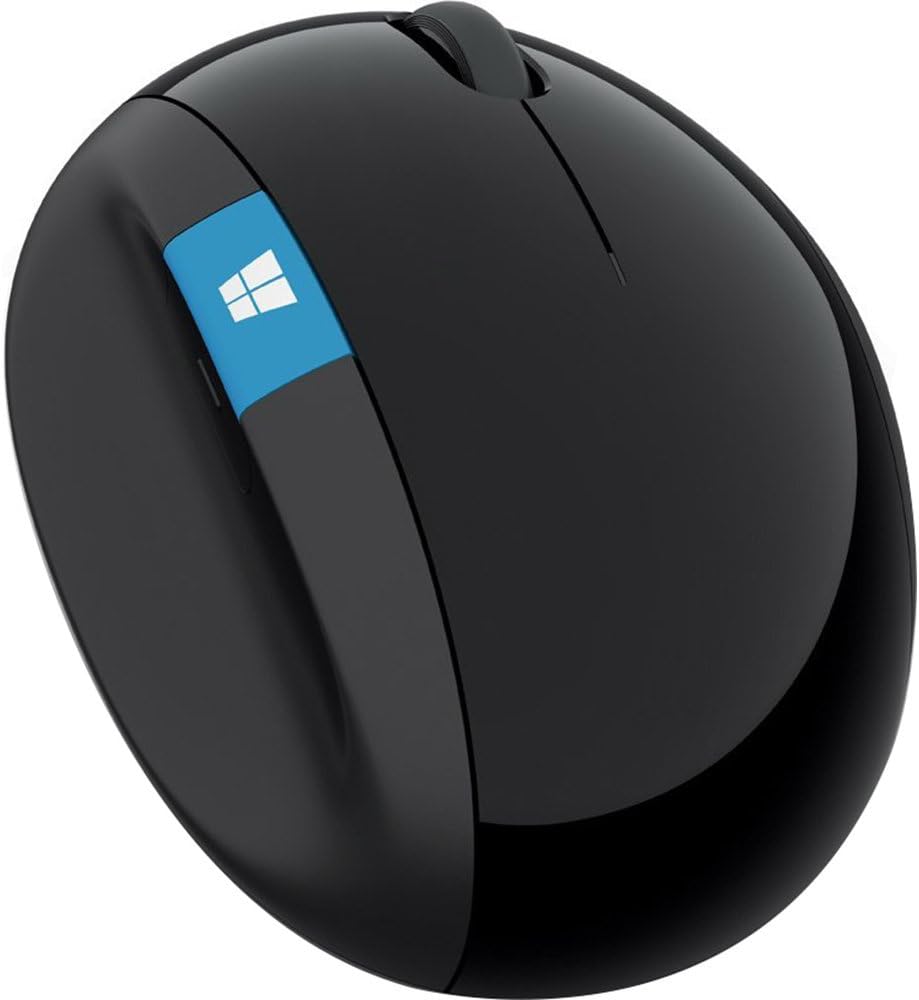
🖱️ Elevate your workspace comfort and command with the Sculpt Ergonomic Mouse — because your wrist deserves the best.
The Microsoft Sculpt Ergonomic Mouse (L6V-00001) is a thoughtfully designed input device tailored for professionals seeking maximum wrist comfort and productivity. Featuring an ergonomic thumb scoop, a versatile 4-way scroll wheel, and dedicated Windows and back buttons, it enhances navigation efficiency. Powered by 2 AAA batteries with long-lasting performance, it supports Windows and select Mac OS versions. Its sleek black design complements modern workspaces, making it a top choice for ergonomic computing.


| ASIN | B00D68ZVY8 |
| Additional Features | Ergonomic Design |
| Antenna Location | Office |
| Are Batteries Included | Yes |
| Are Batteries Required | Yes |
| Best Sellers Rank | #305 in Computer Mice |
| Brand | Microsoft |
| Built-In Media | 2 AAA batteries |
| Button Quantity | 3 |
| Color | Black |
| Compatible Devices | Win 11/10 64 bit, Win 11/10 32 bit, Win 8.1 32 bit, Win 8.1 64 bit, Win 8 32 bit, Win 8 64 bit, Win 7 32 bit, Win 7 64 bit, Win RT 8.1, Win RT 8 Mac OS 10.10, Mac OS 10.9, Mac OS 10.8, Mac OS 10.7 Android 5.0, Nexus 9 |
| Connectivity Technology | USB |
| Customer Reviews | 4.4 out of 5 stars 3,945 Reviews |
| Enclosure Material | Plastic |
| Global Trade Identification Number | 00804067309195, 00885370599572 |
| Hand Orientation | Ambidextrous |
| Hardware Platform | Laptop, PC |
| Item Dimensions L x W | 5.51"L x 3.87"W |
| Item Type Name | Microsoft Sculpt Ergonomic Mouse (LGV-00001) |
| Item Weight | 0.5 Pounds |
| Manufacturer | Microsoft Input |
| Mfr Part Number | L6V-00001 |
| Model Name | L6V-00001 |
| Model Number | L6V-00001 |
| Movement Detection | Optical |
| Movement Detection Technology | Optical |
| Number of Batteries | 2 AAA batteries required. (included) |
| Number of Buttons | 3 |
| Operating System | Windows 8 |
| Power Source | Battery Powered |
| Range | feet |
| Special Feature | Ergonomic Design |
| Style Name | Modern |
| UPC | 804067309195 655643340756 033173680731 809394594566 804904112582 012304006213 044111216349 808112948131 012301323597 617407462579 885370599572 801947292059 012302529226 |
| Unit Count | 1.0 Count |
| Warranty Description | Comes with Manufacturer Warranty. |
M**K
Great mouse but with some caveats that you may or may not care about
I've been using this mouse for about 3 years now. It is an awesome mouse. Very comfortable and ergonomic. Battery life lasts a long time. I've replaced the AA batteries maybe 5 times in 3 years. Tracking works well/smoothely, as expected. Some things I've noticed that are worth being aware of (these don't bother me much, but I imagine they could matter to some folks): * The glossy black surface will tend to collect grease from your fingers over time. It's very noticeable against the shiny black and is kind of nasty. Luckily, it also cleans off very easily (I tend to use an alcohol or clorox wipe). * The black skids on the bottom glide smoothly on the surface of my desk, but they also leave behind black residue on the desk surface over time. My desk's surface is plastic fake wood so I just wipe it off with a wipe every once in a while (takes some scrubbing). If you have a real wood desk, you may want to use a track pad instead. * The connectivity of the dongle can be bad if there is a lot of metal near the receiver. For example, I used to have a metal padlock on the k-slot right next to the USB port where the receiver dongle was plugged in, and that seemed to mess with the connection a lot. On the other hand, plugging this into the back of my monitor seems to work just fine. * On macOS the windows and back buttons do not work. They work find on Windows and Linux.
R**R
The Imperfectly Perfect Mouse
This mouse really deserves five stars, but I am struggling with giving it that rating. This mouse is super comfortable, with the vertical orientation leaving your hand in a natural position as you use it. I've never had wrist or hand problems, but still I notice the positive difference in fatigue when I use this mouse. The mouse is very accurate, and the large glide surface makes it feel like it's floating across the desk. The buttons give great tactile feedback, and the wheel scrolls easily with the steps easy to stop on and easy to scroll from. This could be the most perfect mouse I've ever used, and is such a pleasure to use I bought one for home, too. So why the five-star struggle? This mouse is tall. Very tall compared to the mice I've used over the past 30 years. So tall, in fact, that occasionally (at least it's no longer frequently like when I first received it) when I reach for the mouse, I knock it off my desk. After so many years computing, and reaching for the mouse becoming a mindless activity, I'm so used to a mouse being a certain height, I simply don't reach high enough. So, the side of my hand bangs into the mouse, sending it flying (since the non-friction surface works so well). More often than not when this happens, the bottom cover pops off and the batteries come out. Of course, they never fall next to the mouse - no, I'm crawling on my hands and knees looking under chairs and desks. When I do this at the office it's a minor annoyance, since I have carpeted floors there. At home I have hardwood, and the mouse takes a beating when it falls. So much so that the wheel no longer works. I'm going to have to replace it, but this mouse is so great that I'm going to buy another one. But if I break it again, I may need to look elsewhere, just for my wallet's sake.
D**N
I recommend the Microsoft Ergonomic Mouse over the Microsoft Comfort Mouse
Before this, I have been using the Microsoft Sculpt Comfort mouse for over two years. It has lasted well, but caused me some minor joint pain with my middle, ring, and pinky fingers with extended used. So when I needed a second mouse for a new laptop, I decided to try the Sculpt Ergonomic mouse instead. In short, I would recommend the Ergonomic mouse over Comfort mouse and might retire the Comfort mouse early in favor of a second Ergonomic mouse for my desktop. For the Comfort mouse, I prefer the slightly less stiff wheel and recognize it might be a better choice for either people who want a more traditionally shaped mouse, or people who want more mouse shortcuts (two swipe gestures and a button vs. the Ergonomic mouse's one customizable button), but the Ergonomic mouse is much more comfortable for long periods of time and feels like a more premium product. Although I've had it for less than a week so far, the Ergonomic mouse is much more comfortable. It's larger, a little heavier, and seems to have a little less resistance on my desktop (although that might be just because it's new). The base and battery cover is magnetic which is nice, but not an important difference. It also has a USB receiver instead of using bluetooth, which means I can more easily use it on different computers without the hassle of a bluetooth pairing screen, but could be a problem if you already are short on USB ports or don't want a bump sticking out of your laptop. The Comfort mouse also had occasional hiccups in connectivity (which might be due to my setup), but I haven't experienced this with the Ergonomic mouse. Overall, both are good, but a mouse should first and foremost be comfortable and reliable, and the Ergonomic Mouse is more comfortable and more reliable than the Comfort mouse in my experience.
A**R
Good ergonomic mouse
It is the second mouse of that type I've purchased. I do not remember how long the previous one lasted (about one year and a half - two years?) and then stopped working (the blue light at the bottom oh the mouse blinked like crazy). Unfortunately after my previous MS ergonomic mouse I can not use others any more - they do not feel comfortable enough for my palm or wrist. I tried everything that was on shelves in Staples even these for $99.99 (just put my palm on one after another without purchasing). I am not fan of any brand and I had some Logitech mouses in the past and one Chinese no-name ergonomic mouse purchased here on Amazon. In between my MS ergonomic mouses I used another MS mouse I've used long before and I start feeling some inconvenience in my wrist, but I got used to it. When my new mouse arrived I even felt some mixed senses as if I do not like it any more, but in one week of using this new mouse I noticed I do not feel inconvenience in my wrist (with all mouses I use the same mouse pad with wrist cushion). My palm is not big. I am 5'4"t all, for my husband of 6' tall this mouse is small. I am not a gamer, so I can not tell about is it good or bad mouse for gaming. I do not use this blue Window button, rarely use Back button - I think this button is more convenient on MS Mobil mouse 4000 (this one I used between ergonomic mouses). For me this is good ergonomic mouse.
W**R
sideways ergonomics is the way to go (but I liked the 6000 better)
I am a firm believer in an ergonomic keyboard and mouse---specifically the ones made by Microsoft. Like many people these days, I spend far too much time sitting at a computer desk. A few years ago, I started to get sharp pains in my wrist...and I am fairly young so I knew this was a very bad sign. To circumvent carpal tunnel problems later in life, I became a little obsessed with testing out anything that might alleviate the pain. I tried a variety of options like raised gel pads in front the mouse and keyboard, raised keyboards, different chair and desk heights, a mouse with a trackball, etc. Sometimes they brought a little comfort but nothing really solved the trick completely. Well, that is nothing until I tried out Microsoft! The ergonomic keyboard and mouse took away the pains better than I had expected (I don't have them anymore). A few weeks later, I bought another set for my office and threw out my father's stuff for a replacement at his house and office, too. My mouse of choice was the Microsoft Natural Wireless Laser Mouse 6000 until my second one went downhill. I was not willing to pay $220 for a replacement (what the heck?!). Instead, I took a risk on the Microsoft Sculpt Ergonomic Mouse (L6V-00001) . I am quite happy with its out of the box performance. It took me all of about 15-30 seconds to get it running. WHY A RISK? FEAR #1: Review quality. Most of the reviews are from people on Vine. I like the idea of Vine (wouldn't mind being on it myself!) but I wasn't sure if the company was trying to drum up reviews by sending out freebies. RESPONSE: The reviews are legit and detailed. I don't think they're exaggerations. FEAR #2: Size. Some reviewers touched on the different sizes of the mice. I was perfectly happy with my other model and didn't want an upgrade to send my good luck into a tailspin. RESPONSE: This mouse actually feels smaller in my hand. For people not used to the siderest (like on the Natural Wireless Laser Mouse 6000), I see how the size could feel awkward or terribly large. Actually, I wish it was slightly larger to fill out my hand a little more. Oh well! FEAR #3: The new laser. I am enchanted by Logitech's darkfield technology and enjoy its products. I wanted to get such a mouse for my desktop (already have one for travel with my laptop and it is awesome) but I was fearful of not having a tried-and-true ergonomic mouse. Microsoft's laser claimed it wouldn't work on glass tables when I looked around. My desk is glass but has a tinted shade. RESPONSE: Indeed, it does not work well on the glass. There is a jittery movement. No getting rid of my mousepad for now. Nothing changed here. I'd take away 1/2 a star if I could but this was my own risky decision so I can't fault the mouse all the way. FEAR #4: New buttons on the side. I love my zoom and back buttons on the other mouse. RESPONSE: Eh, I think I'll adjust. I am still not completely used to it even after a month of heavy usage. The back button is located a little too far toward the front of the mouse given how I used my old Microsoft ergonomic mouse (maybe it wasn't perfect for use but it was comfortable). The Windows button is kinda weird, too. I miss my old zoom button because I sometimes work with graphics where zooming in fast is pretty nice. The scroll wheel seems a little more "clicky" but has less friction than my other mouse. This mouse loses points for getting rid of my zoom. I bet I could reprogram the Windows button but that takes a few seconds of effort and I don't want to be constantly reminded of the Windows logo (I do use Unix and Mac systems sometimes). I'm docking a star without hesitation because of the poor placement of the back button and the useless Windows button. FEAR #5: Ease of movement. The other mouse I have glides fairly well as I move back and forth. I've gotten used to a lack of friction. RESPONSE: This mouse is actually a little better in its movement. Out of the box, it felt slightly lighter (indeed the product page says 10.4 ounces vs 1 lb but it's nothing to write home about). I don't care about whether these ergonomic mice are a lot heavier than most mice because I use them for desktop computers---not travel---and I don't plan to pick it up much. If you have a laptop, this may not be the ideal mouse to be lugging around! Sitting next to the older Microsoft ergonomic mouse, the new one reminds me of a smaller yet cool oval rock you might find in a mountain stream while the older one looks like something out of Area 51. This sculpt mouse has a sleeker and lower profile. OVERALL I'm happy. I still like the fit and buttons a little better with its predecessor but the new design is cool and equally as useful. I can get rid of the wireless receiver now. The USB one does stick out a little farther than other competitors' products but I put it in the back of my computer. Would I choose this mouse or the older 6000? Probably the 6000 for comfort but this one for looks. Usability (in its glide and basic clicking) seems slightly better with this one. We'll see how the battery power holds up... *** UPDATE after 2 months: Still works fine and without any complaints. I tossed the v6000. I have gotten a little more used to the new button on the side for clicking "back". Seems like I hold it a little higher and that gives me a better grip as well as an ability to touch the button. I continue to believe the Windows button is rather worthless. I'd rather have something cool (like a transparent window or a glowing light) rather than that button. Scrolling is great with this mouse (both by moving the mouse and with the scroll wheel). I'm happy. When the v6000 goes dead in my office, I'll upgrade to another one or see if Microsoft has another innovation on the market. I don't see a point in trying out other companies any more. No, I'm not getting paid or endorsed by them...I like good products and don't mind raving about them when they improve my life :-) UPDATE after 5 months: Review holds. A solid product. I believe I have replaced the batteries only once and I usually spend a few hours on my CPU on a daily basis. One thing that has impressed me has been the range of movement of the mouse to the scroll icon on the screen (not sure about a range distance from the CPU ). On the older model, I would have to pick it up and move it some to go back and forth across my widescreen dual monitors. This one can almost always go back and forth and, when I do have to pick it up, it's not as heavy to move around.
P**L
My Dream Mouse
I got this mouse after having literally worn the foot pads off of my previous trusty Logitech wireless. I wish I'd changed much sooner. The advantages of this mouse over any other I've tried are several. The primary is the shape, of course. You need to change the way you hold the mouse over traditional flat back models leaving your hand at a roughly 90 degree angle to the surface the mouse runs on. This does take some getting used to both in hand orientation and also your muscle inputs to move the mouse. It took me maybe 10 minutes to get comfortable with the new hand position for normal business oriented tasks. It took me a good deal longer - hours really - to get up to speed in games requiring quick reactions such as getting in a fight where you need to, in real time, operate your character ('toon) or end up in a re-load. The position, like with ergo keyboards, is a natural one. That is, your hand would be in this position while resting meaning the chance of overuse injuries such as carpal tunnel should be decreased. This is a four button mouse which installs drivers and a control program when Windows senses the USB dongle receiver. That is, you plug the dongle in, Windows senses the need for a new driver, installs it and then visits the Microsoft site (presumably) to download the control software which allows you to program the three buttons (left, right, wheel) and other aspects such as speed and acceleration. In addition, the mouse comes with a dedicated Windows button which works like the Windows key on some keyboards. To me, the ergo aspect is perfect and the fine control I have over the cursor is much improved over mice lacking the excellent control software. After installation, you can access the Control Center from either the main menu (Programs) or through Control Panel's Mouse entry. The latter is a link to the Control Center. Clearly the installation was well thought out by people who really know their stuff. A pleasant surprise. Due to the special nature of this mouse and its dedicated software, I doubt it'll work well on a Mac or with a leftie who can't control with his right hand. Otherwise, highly recommended.
A**B
Good mouse, HORRIBLE dongle (cheap plastic falls apart requiring an investment in a WHOLE NEW MOUSE)
The L6V-00001 has never failed me regardless which computer I use it with--desktops or laptops, and any operating system. I purchased this as a replacement for a far more expensive mouse being used with a 2013 Imac, and found, happily, the Microsoft mouse to work flawlessly. I pop the dongle into PC and Mac USB ports whenever I want to transfer the mouse functionality, and without any hiccup, the mouse just works. I also like the magnetic battery door. Over the years I've despised changing mouse batteries mainly because the doors have nearly all been so difficult to pry open. But this Microsoft mouse's battery door remains firmly shut until you turn the mouse over and tug on the smoothly indented lip to open the door. It's almost a pleasure to open and watch the door reseal securely once the lid is let go. Moreover, the mouse tracks remarkably smoothly and accurately on all non-translucent surfaces I've tried to date. My only complaints are: 1)the plastic housing is ugly--and in less than a year has already become badly worn; 2)the mouse is rather small even in my medium-sized hands, which means the arch of my hand doesn't fit comfortably on the mouse, so my hand becomes tired after using the mouse for 60 minutes or so--an oddity in an "ergonomic" mouse; 3)the button to turn the mouse off (and therefore conserve battery power) is so smoothly integrated with the mouse's underside that in low light it's hard to find to turn the mouse off; I wish the mouse instead switched itself off after a certain time remaining idle; 4)the dongle is quite large (about a centimeter sticks out of the USB port when connected). None of these issues is very important to me, as the mouse works so very, very well, and I use it mainly as a desktop (so stationary) mouse. Considering the small fortune I've spent on computer mouses over the years, I'd be happy to replace most our other computer mouses with the Microsoft Sculpt Ergonomic Mouse in the future. UPDATE APRIL 2018 The dongle for this mouse literally fell apart (the plastic housing cracked open, exposing the bare circuitry underneath) while I was on a research assignment at a foreign university. I thought I could get a replacement on coming back to the States, but I've learned from Microsoft that the dongles are all specific to the particular mouse they're sold with. The Microsoft parts operator told me that if the dongle breaks there's no way to get a repalcement even under warranty. I'm stunned. Now I have an otherwise perfectly good mouse with a broken dongle permanently stuck in my MBP's USB dock. I'd have to use pliers to remove the dongle, hoping not to damage my USB port, and then my only option would be to toss this large piece of plastic (the mouse) into yet another landfill. What an environmentally irresponsible, not to mention consumer economics UNfriendly, policy! Given my experience now, just four years later (I STILL have a 2004 black Macbook that works flawlessly; I don't want electronic devices I have to replace every few years), I'm downgrading my original 4-star review to 1-stars. Wasteful-wasteful-wasteful manufacturing and engineering.
N**G
Love this, don't want to use any other mouse now
I love this mouse, I was looking for something that would be better for my wrist, wich was starting to bother me at work. I work in a digitization unit at a university library, I spend ALL day clicking, doing lots of editing. I also didn't want a ball track one, I needed something I could get used to quickly and use with precision. I got them to buy me one of these at work, after having it for a couple weeks, my wrist felt so much better, I made them get them for all the workstations in the area (6 more). My student employees really like them too, one says I have "ruined" her for any other mouse. We all got used to the slight change in angle quickly and were able to do precision work with them. They are a little bigger/heavier than a lot of mice, but it fit well for me and several students, I have fairly small hands, there was a variety of sizes with the students. I've since bought one for my parents and they both like it, and my dad has very large hands that are now tending to shake. I think the slightly bigger and a little heavier mouse makes it easier for him to work with. I've used this for over a year, all day 5 days a week. The other workstations get quite a bit of use also. We haven't had any problems with any of them. The batteries on mine last about 5 months, the other ones last even longer. They have been knocked on the floor various times and have survived. My tower is on the floor and pushed to the back/side of a large desk and I haven't had any issues with it not being able to connect. Haven't had any interference from wifi or something else, I'm at a university and there are various other signals for things all around.
W**N
Microsoft L6V-00001 Sculpt Ergonomic Mouse
The BEST mouse I ever owned. It truly met the definition of ergonomic, without symptoms of carpal tunnel or added stress on my finger and hand joints. I wish the mouse was not decommissioned.
L**M
Expensive
Solid, but expensive
V**.
O MELHOR!!!
Esse é o melhor mouse que já tive. Uma pena que parece ter saído de linha pq nem a Microsoft tem. Mas, felizmente, esse vendedor tem, e por um preço caro mas bem menor que outros raros vendedores, o que fez a minha alegria. Veio super rápido ... agradeço e recomendo!!!
C**T
Muy cómodo
Al principio se siente un poco raro por la forma del mouse, pero una vez que te acostumbras, es el mejor que he probado. Muy muy cómodo, suave al tacto y responde rápido.
S**Y
Excellent ergonomics!
Beats using a traditional mouse, and perfect for my palm size. The transmitter is larger than the keyboard's and would prefer using a single transmitter for both. Not too much of info available online about this, but yet to install the Microsoft Mouse and Keyboard center.
Trustpilot
3 weeks ago
4 days ago