🖨️ Print smarter, save bigger — the future of office efficiency is here!
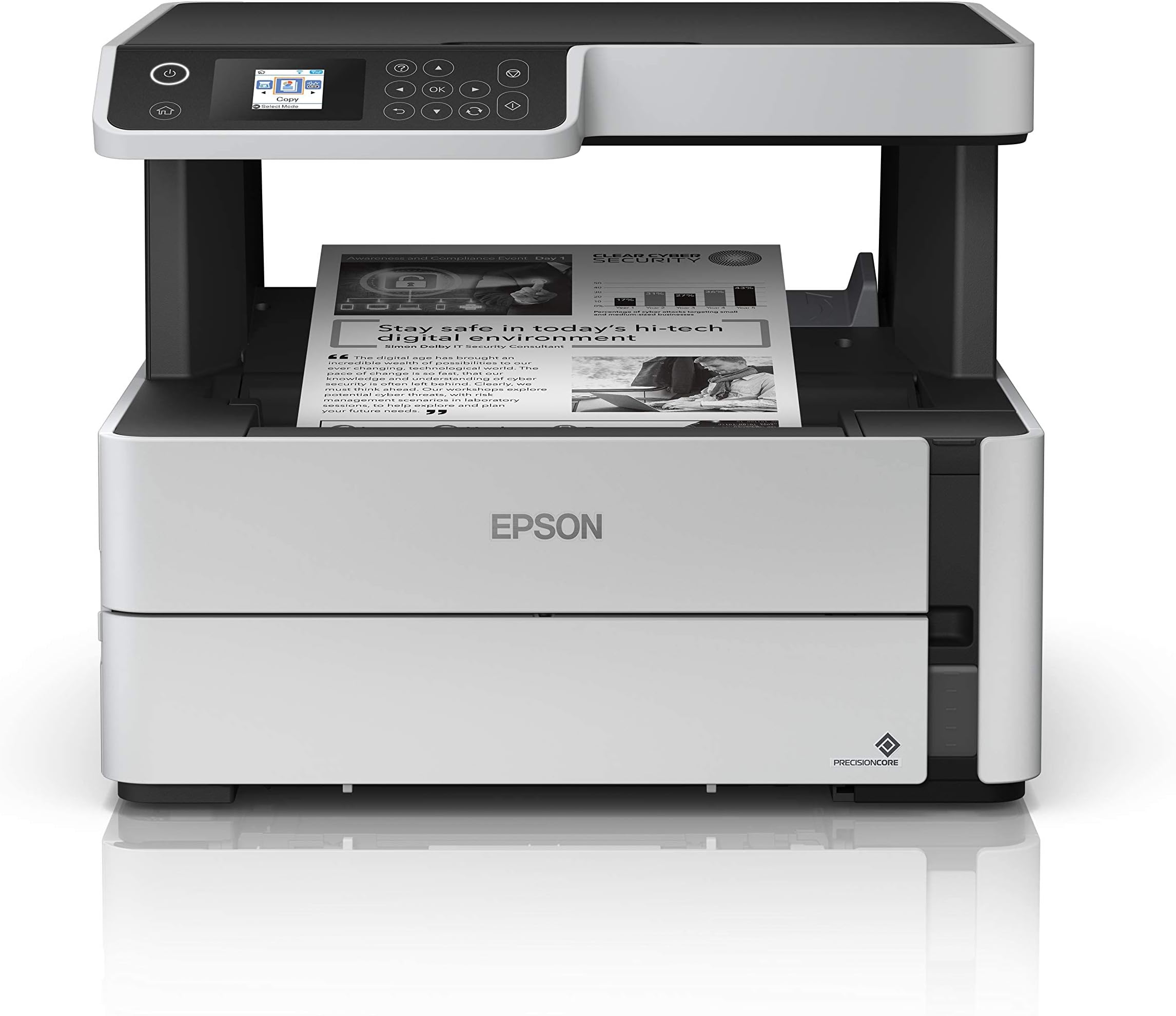
The Epson EcoTank ET-M2170 is a wireless monochrome all-in-one supertank printer designed for small businesses and professionals. Featuring a cartridge-free refillable ink tank with 2 years of unlimited ink, it delivers fast printing speeds up to 20 ppm and high-resolution output at 1200 x 2400 dpi. With auto duplex printing/scanning, a 250-sheet capacity, and versatile connectivity including Ethernet, wireless, and Alexa voice control, it combines efficiency, convenience, and eco-conscious design in a sleek white chassis.


| ASIN | B07Q5XB7PZ |
| Additional Printer Functions | All In One |
| B&W Pages per Minute | 20 ppm |
| Best Sellers Rank | #72,297 in Office Products ( See Top 100 in Office Products ) #70 in Ink Tank Printers |
| Brand | Epson |
| Built-In Media | EcoTank ET-M2170 monochrome printer, manual, CD-ROM for product setup, power cord, 1x bottle 532 Black (120 mL) |
| Color | White |
| Compatible Devices | Laptops, PC |
| Connectivity Technology | Ethernet, Wireless |
| Control Method | Voice |
| Customer Reviews | 4.0 out of 5 stars 295 Reviews |
| Display Type | LCD |
| Dual-sided printing | Yes |
| Duplex | auto |
| Global Trade Identification Number | 00010343946873 |
| Hardware Interface | Ethernet |
| Ink Color | Black/White |
| Item Dimensions D x W x H | 13.7"D x 14.8"W x 11.9"H |
| Item Height | 11.9 inches |
| Item Type Name | Inkjet Printer |
| Item Weight | 13.7 Pounds |
| Manufacturer | Epson |
| Maximum Copy Resolution Black and White | 1200 dpi |
| Maximum Copy Speed Black and White | 30 ppm |
| Maximum Print Resolution Black and White | 1200 x 2400 dpi |
| Maximum Sheet Capacity | 250 |
| Media Size Maximum | 8.5" x 47.2" |
| Model Name | ET-M2170 |
| Model Number | ET-M2170 |
| Model Series | EcoTank |
| Number of Trays | 1 |
| Other Special Features of the Product | Energy Star, Refillable Ink Tank |
| Output sheet capacity | 250 |
| Paper Size | 4" x 6", 5" x 7", A6, Half Letter, Letter, A4, Executive, Legal, User definable (from 2.2" x 3.4" to 8.5" x 47.2") |
| Power Consumption | 12 Watts |
| Print media | Paper (plain) |
| Printer Connectivity Type | Ethernet, Wireless |
| Printer Output Type | Monochrome |
| Printer Type | Inkjet |
| Printing Technology | Inkjet |
| Processor Count | 1 |
| Resolution | 1200 x 2400 dpi |
| Scanner Type | Flatbed |
| Special Feature | Energy Star, Refillable Ink Tank |
| UPC | 010343946873 010343945814 |
| Unit Count | 1.0 Count |
| Warranty Description | 2-year limited warranty in the U.S. and Canada, 2nd year requires product registration |
| Warranty Type | limited warranty |
| Wattage | 12 watts |
C**Z
Best Printer So Far!
I hate using printers because something always goes wrong. I’m happy to say that’s not the case for this one, which has been a delight to use compared to a Canon Pixma. Installation took some time as the printer needed to be connected via the internet to update and print wirelessly. I’d say about 45m-60m tops to get everything up to speed. Wireless settings work well on my old MacBook Pro 2013 computer, as well as scanning documents. Phone connection is not compatible, but Epson has a feature where you can set up an email for this printer to print from anywhere! I’ve used these wonderful features while I was away from home and needed to print something for the parents at home. The caveat is that the printer needs to be on standby for this feature to work, unless the person at home turns on the printer. The main selling point for this printer is that the ink is cheap. It comes with a bottle to fill up the tank, and it’s satisfying to do. The printer has printed over a hundred documents already, and the ink tank is slightly lowered. You can buy aftermarket 532 Ink, and it will work on this printer. The documents come out surprisingly sharp coming from an inkjet printer. It’s not as crisp as a laser/LED printer, though it’s perfect for me. I love printing on this printer, and I highly recommend it.
A**R
No more buying ink all the time. This is a money saver!!
I love this printer. It does everything but fax. You can print from your computer, phone or any device you set up. I can't say enough good things about the ink, you save so much money and you don't have to buy ink all the time. It does not take cartridges. you just pour the bottle of ink in and your good to go for about 6 months depending on how much you print. I also love the quality of the print job! I will never go back to cartridges again. UPDATE: I have had this printer for a month now and printed page after page daily and the ink level is still almost to full. I was buying printers all the time or ink but with this printer ink is a thing of the past. This printer is the best I have ever had and I am so happy I found it. I was always running low on ink or it ran out within a few days. Don't be afraid to purchase this printer. You really won't be sorry. Oh yeah the printing is excellent too. I just need black ink but if you need color then this isn't the printer for you. Hope this helps
R**N
Really Unhappy With This printer
Have had the printer about a week now. The actual printing quality is ok. Not great, But certainly acceptable and useable for me. And the printer is quick and its quiet. But those are about all I can think of that is good about this printer. The manual and the online support information, is dismal. The setup and operation info in the manual is undoubtedly some of the worst, vague and must unhelpful that I have ever seen in a manual for a product like this. The online information is not much better. The setup and the operation of this machine is in NO way intuitive. In fact it is just plain not easy to figure out how to set it up and then how to use it, with the manual in hand. The way the printer is designed with two separate levels, I don't think that anyone simply can see the user screen when you are sitting down at your computer. I sure can't. I am 6' tall. The bottom of the printer is sitting on a part of my desk that is 29 1/4" tall and is about 23" away from where I sit in front of the computer. The center of the screen is at 41 1/2" from the floor. I cannot read anything on the screen without leaning WAY over and craning my head UP as high as I can stretch my neck. Super uncomfortable and super really just annoying. Terrible design. The screen is not readable at all unless you are looking at it from right in front of it. You cannot read it from the side. So the screen is set up so high and with zero view from the side, you pretty much have to stand up and put your face right in front of the screen to read the thing. And the operation of the different sections and tools on the screen are also very unintuitive and hard to navigate. TINY fonts! REALLY a TERRIBLE design on the screen. In my mind, THAT is the worst physical feature of the printer. Lastly, removing the sheets of paper after you have printed something on them, is unnecessarily difficult to do without slightly bending the sheet as you remove it. It's just silly the way they have designed the printer for you REMOVE A PRINTED PIECE OF PAPER! There are small indentations on the printer on both sides of the (upside down) printed sheet for you to be able to get a finger under the sheet of paper to remove it after it prints. But the indentations AREN'T deep enough to be able to get your finger under the sheet enough to get it out without slightly scrunching the paper. Is it asking too much to be able to remove a PERFECT and undamaged looking printed sheet of paper after it has printed? I have not copied or scanned anything yet. Have only printed from the computer. I am afraid to at this point. Again, the printer prints decently. It is fast and it's quiet. Would I recommend this machine to a friend? Absolutely not. The aggravation factor on this particular printer is just WAY too high. Epson.... SHAQ....C'mon Mannnn!
G**R
Great printer
Excellent printer for black and white copies.
U**9
Great printer in-depth review. Remember it’s black and white.
If you’re tired of constantly buying overpriced toner or ink cartridges, the Epson EcoTank ET-M2170 is a refreshing change. This monochrome all-in-one printer is clearly designed with efficiency and long-term savings in mind—and it delivers. Print Quality & Speed: For a black-and-white printer, the output is sharp and consistent. Text documents come out clean and professional, even at small font sizes. It’s not blazing fast, but the speed is solid for home offices or small business environments—around 20 pages per minute, and the first page comes out quickly. Ink Efficiency: The star of the show is the refillable ink tank. Epson claims you can print up to 6,000 pages before needing a refill, and I believe it. After weeks of steady printing, the ink levels barely moved. Refilling is simple and mess-free thanks to the smart bottle design. You’ll save a lot over time compared to laser printers. Build & Design: It’s compact enough to fit on a desk without taking over. The design is minimal and modern, with a clear monochrome display and easy navigation buttons. It doesn’t have a touchscreen, which would’ve been a nice upgrade, but it’s easy to use regardless. Connectivity: You get Ethernet, Wi-Fi, and Wi-Fi Direct, so it works well across multiple devices. Setup was painless, and I had it printing from my laptop and phone within minutes. It doesn’t support color (of course) or duplex scanning, but it does offer automatic two-sided printing—a huge plus for saving paper. Scanner & Copier: The scanner works well for documents and simple grayscale copies, though it’s not meant for detailed image scanning. If you need crisp document scans, it gets the job done. Bottom line: The Epson ET-M2170 is perfect for people who print a lot of black-and-white documents and want low running costs without sacrificing quality. It’s not flashy, but it’s smart, economical, and built to last. Ideal for students, home offices, or small businesses that don’t need color.
K**S
So far so great!
Bought this a few months aga, to get away from having to buy expensive color ink cartridges , as we never really need to print in color. This printer works great and the ink refills are inexpensive. My only complaining is there's no paper feeder for scanning multiple pages or for copying multiple pages. You have to add sheets on the glass on at a time and press a command to continue scanning next page or end. This actually may be better for the life of the scanner/copier, as the paper feeder is usually the first thing to malfunction on a printer/scanner... So, it's an excellent printer for B&W needs that will in the long run be less expensive to operate than a color printer. May not be good if you need to regularly scan or copy multi-page documents. Sorta feels like I'm getting back off the grid with this printer, which is a good thing...
M**D
Absolutely LOVE this printer!!!!
I rarely leave reviews but I have to this time. I am working on a doctorate and bought this printer late last year to print out research because my other printer was costing an arm, leg and half my rear end in ink! However, this printer has literally printed out almost 5,000 pages before needing a refill in ink (on draft), which was simple. I have not yet figured out how to get the computer to recognize the ink has been refilled, but I keep an eye on it and just go with the flow (literally). I LOVE this printer! If you are in need of a B&W printer and HATE the idea of spending more $$$ in cartridges, this printer is for you! It has literally already paid for itself in ink in 5 months! (I am printing A LOT, so keep that in mind). Fast!!!! and easy to use (although the window display on the printer could be bigger-it's about the size of a silver dollar)!
C**A
Just what I needed
Perfect, just the one I needed as a tattoo artist. It prints perfect and it saves you a lot of time!
Trustpilot
2 weeks ago
2 weeks ago