Desertcart purchases this item on your behalf and handles shipping, customs, and support to USA.
๐ก Never Miss a Beat: Boost Your Signal, Boost Your Life!
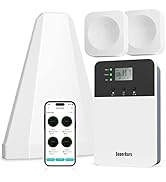
The HiBoost Cell Phone Booster enhances 4G and 5G LTE signals across multiple frequency bands, providing up to 4000 sq ft of coverage for homes and offices. Compatible with all major US and Canadian carriers, it features an easy app-guided installation with real-time signal monitoring and comes with a 3-year warranty and dedicated customer support.


| Asin | B07TQ7JMVN |
| Best Sellers Rank | #255,216 in Cell Phones & Accessories (See Top 100 in Cell Phones & Accessories) #449 in Cell Phone Signal Boosters |
| Brand | HiBoost |
| Built In Media | Power adapter, Instruction manual |
| Color | Transparent |
| Compatible Devices | Smartphone |
| Connector Type | RJ45 |
| Customer Reviews | 4.2 4.2 out of 5 stars (329) 4.2 out of 5 stars |
| Eu Spare Part Availability Duration | 3 Years |
| Frequency Bands Supported | 700 MHz (Band 12/17), 850 MHz (Band 5), 1700/2100 MHz (Band 4), 1900 MHz (Band 2) |
| Item Weight | 6 Pounds |
| Manufacturer | HiBoost |
| Mfr Part Number | 4K Plus |
| Range | 4000 Feet |
| Smart Home Compatibility | Not Smart Home Compatible |
| Special Features | 5G Support, Compatibility with all US and Canadian Carriers, App-Guided Installation |
| Unit Count | 1.0 Count |
| Upc | 855671006994 |
| Wireless Compability | 802.11a/b/g/n/ac, 802.11g 108 Mbps, Bluetooth |
User
Works great for my friend, he no longer has weak signal in his home
The first thing I will say is that this device is not a 100 percent guarantee. Some area just do not have a good signal no matter how much you boost it so be aware of that. That being said, this device worked really well for my friend. It is a bit of a challenge to install though so be aware of that. This is not something you can just put inside your house and expect to work. It takes positioning and installation on your roof to work. Once it is actually installed, it actually works pretty well. It can be a bit of a challenge just finding the right spot for it when putting this device on the roof. It is one of those calibrating the antenna to get a good signal. I try to put everything upstairs as the best results will occur upstairs as signal tends to travel down better than up. That being said I would recommended you install the indoor device upstairs. The device inside does show the signal it picks up and how strong the signal is which is nice. The next thing I would say is if you are not good with drilling this probably will not be as easy for you as there has to be a little drilling to run the cables to each other. The antenna and cable are both meant for outdoor usage so you do not have to worry about any weather damage. There is no wireless connection between the antenna and the indoor device. This device does work best on the roof and the wiring is best drilled into the wall for better management. You do not have to run the wire through the wall per say but it does not look good with the cable clutter. For my friend, I also suggested he place the device inside a bit further away from my router/modem as it reduces that chance of any signal interference from the internet modem or router. The cable length is pretty long so you do not have to worry about not having enough cable length to reach the antenna above the house. The digital indicators are good in displaying the needed information. Be aware that this booster does run a bit warm so make sure it has properly cooled room and not left in direct sunlight. It does come with majority of the things you may need to install it. The antenna is literally like a satellite dish where you would need to move the device around to get the best signal. You want to move the antenna around and I would recommend doing this with another person for safety. This process can take several hours depending on if you need to adjust the antenna accordingly. The main box is very simple but big so finding a spot for this can be a bit annoying. The wires are shielded so they will be okay outside but not the actual device. It does boost the signal significantly in my opinion and it does exactly what it is suppose to. My friends home has significantly better signal all around. There are no longer any dead zone in his home. The signal in my opinion is significantly better better than what it used to be. One thing I will note is that this device is not a guarantee of a signal boost as again some places are just impossible to get a good signal.
User
Greatly improved my cell phone signal reception in the house.
Now that many of us are working from home, cellular dead zones aren't just annoying, they're mission-critical for a smooth work flow. If you have a weak or even no cellular signal inside your home, a cellular signal booster like this Hiboost model can definitely help.The basic principle behind signal boosters is simple: A big antenna is always better than a small one. Instead of relying on the tiny antenna in your phone, they capture cellular signal using a large antenna in your window or outside your house (or trailer/caravan), then pass that signal through a device that cleans and amplifies it, and out through a re-broadcaster inside your home.Like I did before, there is actually one key trick you can try before investing in a home booster. All of the wireless carriers have Wi-Fi calling now, so you can hook your phone up to your home Wi-Fi network and make phone calls. Unfortunately, my current phone carrier (T-Mobile) has a big problem with sending picture messages and group chats over Wi-Fi. So, a booster was the solution right there for me.After researching multiple devices and ready reviews, I finally decided to go with the Hiboost model, which is apparently a solid brand. The device has three main components: an external antenna outside my home; the booster itself, which cleans and amplifies signal; and an antenna inside the house. They're all connected by coaxial cable, which is also included in this kit.This cell phone booster supports AT&T, T-Mobile, and Verizon; and uses a directional antenna outside but an omni-directional antenna inside. This actually allowed me to fiddle with the outside antenna to get the strongest possible signal, but also placing the inside antenna anywhere I wanted and still get coverage. It easily covered the whole house as well, which was great.HiBoost's lineup also has a unique and cool feature I actually enjoy as well, is that there are LCDs on the front of the boosters showing signal strength on each of the covered bands. The โSignal Supervisor" APP of HiBoost also provided some great help during installation, and thus I recommend you to use it as well (or leave the installation to a professional, if tech is not your area of expertise).Things to keep in mind: Most boosters handle bands 2/4/66, 5, 12, 13, and 17. That includes base coverage bands for AT&T, T-Mobile, and Verizon. The important missing band is 71, T-Mobile's 600MHz rural coverage band. Because it took a while for TV stations to get out of that band, the FCC hasn't approved any consumer boosters for band 71. So, you're just not going to find one.Most home boosters also boost between 64 and 71dB of signal. Once again, that's due to FCC regulations. If you need more of a boost than that, you need to go to Cel-Fi's single-carrier booster line, which can get to 100dB by boosting only the frequencies used by one wireless carrier at a time.
User
Problem Solver
I recently purchased the 4K device to address the cellular coverage issues for a work project. Since the project sites were located over 30 miles away from any cell sites and had poor coverage, I was in need of a reliable solution. Upon deploying the device's antenna in the correct direction, I observed a significant improvement in my signal strength. The status bar, which initially showed no bars, quickly climbed to 3-4 bars, providing me with a much more reliable connection.To gauge the effectiveness of the device, I conducted speed tests before and after its installation. Prior to using the device, I couldn't even achieve an upload speed. However, with the hiboost 4K device, I was pleasantly surprised by the significant improvement in speed. The upload speed I obtained was considerably better, enabling me to efficiently carry out my work tasks.Unfortunately, I encountered an incident with the external antenna at one point. However, I reached out to the customer service department, and I had the pleasure of speaking with Dominic. He was truly awesome in his support. Not only did he promptly address my issue, but he also went the extra mile by shipping out a replacement antenna. Dominic even guided me through the process of optimizing the device, ensuring that I had the best possible performance.In light of my positive experience, I wholeheartedly recommend the hiboost 4K device to anyone seeking to enhance their cellular coverage. It has proven to be a reliable and effective solution, even in challenging conditions. With its outstanding performance and exceptional customer service, I am more than satisfied with my purchase.
User
Works better than expected and other brand.
A short background but Iโll just say it works FANTASTIC (4 full bars!) if you donโt want to read the long story.Wasnโt expecting too much since the other one we previously bought did nothing to improve signal reception.Also spending a couple hundred more had us concerned that a minor signal upgrade would be underwhelming.We live in a rural area and get zero to 2 bars. Sometimes in certain areas of the house we get 3 but even then calls get dropped or โcan you hear me?โ happens.Instructions are easy to follow, setting up external pole for antenna was the most difficult part. So itโs quite easy to find the proper setup since we have only one direction for our strongest signal. If you have multiple carriers, the apps or LCD will help optimize the outdoor antenna direction. Instructions in manual.Once I wired the unit, the cable going into the outdoor slipped out of the co-ax fitting. Oh, this was a used unit I bought from Amazon. Appears whomever had it before may have pulled the cable hard enough that it was in the fitting but when I set it up and pulled the slack out, it slipped right out.Then, Dominic in support to the rescue! I went to HiBoosts website and emailed support. Dominic called back and texted me. I called back and we texted back and forth.I sent picture for the loose cable and he is sending out a new cable!I have it taped and itโs working but HiBoost support is sending a new cable to replace the bad terminal connection 5- Stars โจ for support!Now we plugged the antenna in, plugged in our HiBoost 4K Plus and bam! 4 bars all around. My iPhone has a couple areas of 3 bars vs. my wifeโs Samsung.The speeds we previously got range from .1 - 20Mbps. though even when itโs 10-20Mbps, our internet service on phone or hotspot would lag.Sometimes we would have 3 bars and a web page would not refresh.So the result now is 4 Bars and consistent web page refresh all the time. Yippee!!!!The change is DRAMATIC! My iPhone isnโtas fast download as the Samsung 30 vs 60-70Mbps.As a past systems admin and tech geek and my wife being a Cisco engineer, we HIGHLY recommend HiBoost if you got 1-2 bars and are looking for better cell reception.Hope this helps you out.
User
It was a disappointment, see why
Installed on 35 feet poleFirst two days it fed pretty good internet, then then the internet got lost. After that it was all erratic performance. Then it started flashing showing oscillation, which is interference between the outdoor antenna and the booster. There was 35 feet vertical separation done, which is more than the 20 required feet. I put the booster even more away, oscillation stopped. next day again oscillation, this time it wanted even more separation, and oscillation stopped. Next day again oscillation, now it asked for even more separation, goodness, I was getting fed up!This was just too much to call it normal! It was not, by any means.The display showed 35 to 50 mbps download speed, and 10 dbi gain when in fact I was getting dial up speed to none at all! The display just lied its a** off...I called the company to may be have some help sorting things out, but nobody ever picked up, just dead, it redirects you to voice mail box, tells its full, then dials up again. The robot tells you no one available, leave a message, then it again tells you voice mail box full and perpetuates it like that.I then wrote an email to their tech support. no reply, nobody ever got back.what do you do in this case? i doubt there was anything they could even do, because I know where all my towers are, where to aim etc, and at first it worked a miracle, but then everything was just falling apart performance vise, it was just like this equipment was deteriorating on a daily basis, no adjustments were working no more, no trying all the towers we have, just no nothing!So what do you do in such case? Pack up and return, and certainly no more HiBoost, Ill be looking elsewhere, for more solid equipment, not just looks.Note I purchased NEW, and it still was a mess. In my opinion it is not complicated to install this stuff, not complicated to get it to work well with good speeds. The problem is that the equipment does not perform the same sold as the first few days, after they pass!
User
My review of the HiBoost 4K Plus
This is my first cell phone booster; historically we only get 2 bars around the house, and we live in the city in a cul-de-sac. We have Spectrum mobile which operates on Verizon towers, and it is difficult to talk inside the house unless you move near the window. We also have Spectrum Internet, so the only problem is talking on the cell phone. The HiBoost 4K Plus was easy to setup and install, using the Signal Supervisor app on my Android. I did run into a couple of minor issues, one was the ALC flashing light on the booster, and the other one was not enough distance horizontally between the outside antenna and the booster.HiBoost technical support, Dominic responded to my email immediately with instructions on how to adjust and put some separation between the antenna and the booster. I finally ended up installing the booster inside the HVAC room which resolved the flashing ALC light problem. The signal is strong even inside the HVAC room. I now have 4 bars downstairs and 3-4 bars upstairs throughout the house. What I like most about the HiBoost now, is no more dropped video calls with Google Duo to my friends and I no longer have to stand next to the window. I am also a DAV and have a Verizon VA issued iPad I use to do my VA Video connect calls with my doctor and now it too has 4 bars, so the video calls between me and my doctor are excellent.In closing, the 4 bars I now have inside the house with the HiBoost is a great morale booster for both the wife and me. Attached are pictures of the cell phone outside antenna mounted on a mast with my TV over-the air Bowtie antenna and the booster installed in my HVAC room. I would highly recommend the HiBoost 4K Plus Booster and give this product a 5-star rating.V/rEd
User
Wish I would have gotten a new one like I ordered- UPDATED
This was the second one I received as a replacement for the first one I received was used just like this one. I returned the second one as well and I will get my money back I DIDN'T PAY FOR USED.Update: Was contacted by the company and sent another for free. It works finally after 2 years. Advise to go direct with company not thru Amazon.
User
It works for me (*)
I will tell you that this product works for me. But, if you are not-so-technical, it isn't entirely obvious that it does work until you do a bit of testing. Let me walk you some advice for this product.1) Take the "cellular amplifier must be 20 feet away from the wired antenna" advice seriously. If it is that close, you can turn your site into a "no-cell zone". The further away the two are, the better.2) There are good free products out there to help with the testing. Test your network throughput before and after installation. Know where your cellular towers are at. Use the app that comes with the product when you're pointing your antenna. I recommend using speedof.me as a bandwidth testing site. I got my best results testing with that site. To find your cellular towers, use the Opensignal app (I use it on my Android phone). That app will show you where you are in relation to your cellular towers. That helps in pointing your antenna. Don't be afraid to do some driving to get a feel for what the tower provides (I had one tower provide 5G, the other tower didn't).3) Use what you have at home. I use a Genie receiver for Direct TV. That has a bandwidth test that - while it isn't detailed in any way - it does provide a "real world" feel for any improvement.So, some details about my situation....I'm on the edge of farm country in Central Ohio. I just moved my cellular business to T-Mobile (because I could get unlimited bandwidth on their system at one price). I have a OnePlus 9 and the most current T-Mobile hot spot for internet.For the OnePlus, where I would get one-bar in my house (Aluminum siding), I now get 4 bars. Where I wouldn't get 5G before, I'm on the fringe of getting 5G at times at the same location in my house. However, I would not necessarily get improved data bandwidth on the phone.My bandwidth did jump for the hot spot. I went from testing at 15-20Mbps before to 90-95Mbps after. My hotspot tells me I have poor reception...but the bandwidth tells me differently. Make sure you do your testing.The DirectTV test told me that where I would be okay for HD streaming, I am now good for 4K streaming with the system.There is probably some discussion and research about cellular bands I should do to provide some reasoning behind all of this...but I want to keep this simple.The product itself is good. If you're like me, you will need an additional mount for the antenna beyond what is provided with the product. I used a wall mount that you could mount a satellite dish to your house with.The seller went out of his way to send messages to me about providing assistance. I didn't take him up on that...but don't let that stop you if you need help.I don't know what working with the manufacturer is like.So here's the bottom line. Do your research and make sure the amplifier will work with your carrier. Make sure your situation will provide you with the ability to separate the antenna and sending unit by at least 20'. Do your testing before and after installation. If you are like me, you will be pleased with this product.'
Trustpilot
1 month ago
2 months ago