

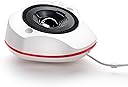
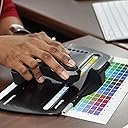
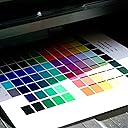
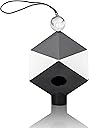


Datacolor SXSSR100 Spyder X Studio: Suite of Photo Tools for Precision Control from Capture to Editing and Print
Product ID: 145378374
⚡4X faster calibration
🎨64-bit technology
🖨️Custom printer profiles
📸 Capture, Edit, Print: Perfected!
The Datacolor Spyder X Studio is a comprehensive suite designed for professional photographers, offering advanced tools for monitor calibration, printer profiling, and precise color management. With features like 4X faster calibration and customizable profiles, it ensures that every step of your workflow is optimized for accuracy and quality.
| Best Sellers Rank | #112 in Photographic Light Meter Color Calibration Charts |
| Customer Reviews | 3.8 out of 5 stars 92 Reviews |
K**Y
Printer calibration more involved than monitor calibration
It's not a like or dislike but if you download and print all the directions for both monitor and printer calibration you will have approximately 23 pages not counting the four color pages to print for printer calibration or the 13 pages for the color cube ( which is used to calibrate for your camera if you are also doing the photography ). Fortunately most pages are diagrams with some text. Calibrating your monitor is fairly strait forward. Allow yourself plenty of time to to calibrate the printer. Somewhat rime consuming (at least the first time around) but well worth it. It took me awhile to get the feel of sliding the color print reader so don't get discouraged and don't push to hard.
J**S
A great Photo Tool
My goal was to color correct printed photos from my Canon Pro 100 printer. After calibrating the printer with the spider tools, I got great results. In my option this is a must tool if one wants accurate color in printed photos.
D**O
could be good but a couple things....
Seems like a tight package with everything one would need. But here are a couple challenges we ran into: The sliding calibration tool has to much resistance to easily slide along the color check boxes. You can but there is definitely not a sliding feeling to it which it should be. I could no locate the icc profiles after creation. The first computers user is located on an external drive. We thought that could be part of it. Tech support did respond and in professional and timely manner. No complaints there. Since that could have possibly been the issue, we installed on a second computer and it replicated the same thing. OS- Mac Latest updates Myself and two of our IT techs attempted to figure it out and we couldn't. It might be a fluke but please keep that in mind.
D**T
It takes some time, but the results are worth it
I bought this suite to calibrate my desktop (LG Ultrawide) and laptop (Dell) monitors and to correct the color on my Canon Pixma iX6820 printer. The monitor calibration was easy with the step-by-step guide. Printer calibration is trickier, but it ended up with a near-perfect match to the monitor. The printer's saturation is lower, but that's to be expected. The main stumbling block for me with the printer was with printing the sample sheets. The first time I did it, I did not disable printer color management, and I got an improved but not great result. The second time -- with printer color management turned off -- resulted in perfect shade matching between the monitor and printer. I calibrated glossy photo paper and plain paper separately, and they both look great. Monitor calibration works for all programs, but the printer calibration requires Windows software that can load the color management file. I use Adobe Lightroom, and it has that capability. This is not a limitation of the Datacolor software, but of the printer itself. I wish I had bought this suite long ago. I would have saved lots of time I spent tweaking colors to get them to print "right" and would have saved lots of ink.
D**K
SpyderX Great, but SpyderPrint Defective
This pains me to write this review because I had high hopes for this product. The SpyderX is used to calibrate your monitor. The SpyderPrint is used to calibrate your printer for the combination of printer + ink + paper (critical for a good quality print). I'm giving this one star because of the SpyderPrint. It was completely unusable for me. I'm not sure whether it was the specific unit I purchased or generic problems with the SpyderPrint hardware and software. The calibration hardware drags against the printer paper when trying to capture readings using the strip method. It sticks and grabs, causing missed readings. I.e., a cell will be marked red as "reading error," and you can't move to the next row. That is either a hardware design or manufacturing problem. Where it gets ugly is that you are supposed to be able to recapture a single cell by selecting the error cell with your mouse and then get a new reading for that cell by placing the SpyderPrint sensor over the bad cell and clicking the button. Sometimes this works; sometimes not. After attempting to reread a cell several times, the software will lock up. The ONLY way to unlock the software is to reboot the system (a new MacBook Pro M1). I tried several times to make this work. Always the same result. The bottom line - Is do NOT buy this product. If you want to calibrate your monitor, buy the standalone SpyderX monitor calibrator. Best, Dan. p.s. At this point, I'm trying to find another printer calibration solution. The only reliable option I can see is the X-rite i1Basic Pro 3. However, at $1,740, it's too pricey. I am still looking.
F**N
Buen precio/calidad/compromiso.
Aunque a nivel de resultados aun no logro tener resultados óptimos, puede ser error en la tecnica de medición. Me tocará practicarlo con mas frecuencia
K**.
Monitor Calibration is Great, Printer Calibration Not So Much
My wife and I are serious hobbyist photographers. Much of our photography is for reference photos for her pastel paintings, but we also shoot to print photos. We purchased the Datacolor SpyderX Studio to get a better match between our edited images and prints. The SpyderX Elite that is part of the package works great. The install was easy and made edits on screen much better. We have not tested the Spyder Print calibration for two reasons. First, our Epson Stylus Photo R2400 finally died after 14 years of great service and we had to upgrade. We haven't had the new printer long, an Epson SC-P700, and are looking forward to putting it to use. But so far I have not been able to do so because I can't get the Spyder Print software authorized on my brand new MacBook Pro 13". I was able to get a license code and authorized the software on my wife's laptop running Windows 10 without a problem, but I've been trying for two weeks to get it up and running on the Mac trading emails with support after submitting a ticket. The gist of the emails I get from them is "try again." Since I'm the hardware person in our family, I need it to work on the MacBook Pro but can't. So an important part of our $400+ investment is useless to me so far, and my experience with Datacolor technical support has been very poor. If you're a Windows user, this is a great package. If you're a Mac user, so far I can't recommend the Spyder Print portion of the package because I haven't been able to use it yet. My overall rating is based on not being able to use half of what we bought. Datacolor needs to up their support game in a serious way, allowing for an opportunity to actually talk with a human being rather than exchanging an endless cycle of unhelpful emails. Update 10/28/2020: I've been working with Datacolor's tech support to get the Mac version of the Spyder Print software activated on my brand new MacBook Pro. It appears so far that the software is NOT compatible with current macOS. I was able to activate it on a Windows 10 virtual machine running on the same Mac hardware, so the only conclusion to draw is that the Spyder Print software does not work on the Mac platform. I'm downgrading my rating by one star since Datacolor's tech support has not seemed to be able to figure out what the problem is.
B**T
Getting accurate printer profiles
I've been involved in digital imaging since 1990. Two of the most common errors in profiling are not turning color management off and not letting your profile output sheet to completely DRY before using the spectrophotometer. If you need to speed up the profiling process use a hair dryer to gently dry your output sheet. If you notice a shift during the Winter then increase the humidity in the area in which your printing paper is stored.
F**L
Meets stated use.
Arrived as stated. Meets my needs and works very well!
L**D
Donne des couleurs réaliste jusqu'à à l imprimante
Packs idéal tout fonctionne a merveille. Le cube est vraiment magique.dommage que tout les modes d emploi ne soit pas rédigé en français
D**L
Come into my web said the Spyder to the fly...
The Spyder Print, I learn from other reviews, is not Mac compatible. Why was that not part of the specs, particularly when photographers tend to prefer Macs? Poor to no instructions. Poor online support. Totally frustrating and waste of time and effort. Profiles not saving. Not user friendly. Amazon needs to better vet products. Been bitten before. So, more money but no benefit. The monitor calibrator works, but that gets one star only because the vendor is incompetent and lacking in integrity. Too long stuck in this web having my lifetime sucked out of me.
P**A
finally gave in to buying this kit
finally gave in to buying this kit to get the best out of my new printer and wow doesn't it make a difference might seem a lot to pay but will give more reliable results and at home to no waiting for them to arrive.
A**R
dedicated tool but works well
screen and printer color calibration and profiles made great.
Trustpilot
3 weeks ago
1 month ago