


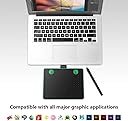
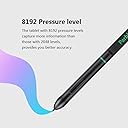
Product description Parblo A640 Drawing Tablet also Support Online Teaching, E-learning, Remote Work, Web Conference 1. Parblo A640 is ideal for Online Education, you only need a stylus and A640, teachers and students can easily handwritten edit, diagram, do the math, annotate on virtual whiteboard in Zoom, Team and Xsplit while streaming or broadcasting. It is compatible with Word, Powerpoint OneNote and more. It is also perfect for taking notes, jotting down ideas and business signature during web conferencing and remote working. 2. Compatible with Windows 10/8/7/, mac OS 10.11 or later version. For students, you can still take important notes at any time, like in the classroom. For teachers, you can edit your course file in real-time and then share it with your student, this tablet will make your distance education more intuitive and effective. Or if you use it for remote work, you can record minutes or jot down ideas and inspirations with ease during web conferencing, it will help your work more effectively, more productive, and slightly more fun. The Parblo A640 Drawing Tablet is not a stand-alone product. It needs to be connected with your computer and installed the driver to use. Our driver will be regularly updated, so please go to Parblo official web to download the newest driver, and install it on your computer. Driver Download: Our driver will be regularly updated, so please go to Parblo official web to download the newest driver, and install it on your computer. 3.1 For Windows Users: Please make sure there is no other brand driver on the computer and close all drawing programs or anti-virus programs before installation. (IMPORTANT) Please run as administrator when installing the driver. Find "PenTablet" for windows setting, "PenTabletSetting" for Mac setting 3.2 For Mac Mojave (10.14), Catalina (10.15) Users: Our driver is compatible with Mac OS Mojave (10.14) and Catalina (10.15), please install the newest released driver on your computer. After the driver is installed, click the driver and the following picture will pop up. Please click "Open System Preferences", Click "Click the lock to make changes" to unlock it, In "Accessibility", "Tick "PenTabletSetting", and click "Click the lock to make changes" to lock it, Click "Input Monitoring", add "PenTabeltDrier" and "PenTablet Setting". Then, click "Click the lock to make changes" to lock it. Battery-free & 8192 Pressure Levels Drawing Pen The 8192 levels of pressure pen can provide you better accuracy and performance. The strokes you make with the pen ranging from thick lines to hairline designs can be as precise as you need them to be. A battery-free, tilt support built-in pen keeps you having to worry about charging it. 4 Customizable Hotkeys & TYPE-C USB Interface Equipped with 4 customizable hotkeys, will allow you to customize as well as program the keys for your favorite shortcuts. Not like normal USB interface, TYPE-C interface helps you transmit the data more quickly and effectively. Compact Design with 6x4 inch Working Area A640 digital drawing tablet is only 5mm in thickness and 200g in weight. Slim and compact design with an active area of 6X4 inch makes it perfect for limited desktop space and easy to carry out when on a trip. Pen Jacket The pen jacket is a user-friendly design. Specially designed to prevent the pen from dropping by accidentally when you carry the tablet to go outside. What's in the Box Pen Tablet A640 X1 Digital Pen X1 Pen Nibs x6 / Nib removal tool x1 USB Cable x1 User Guide x1 Compatibility Compatible with Windows 10/8/7, Mac OS version 10.11 and above. Compatible with most drawing software Photoshop, Krita, Illustrator, SAI2, SketchBookPro, FireAlpaca, OpenCanvas, Manga Studio and so on. Parblo A640 Can be used for Digital Art Creation, Online Teaching, E-Learning and Remote Work from Home Review: Easy to use and works well - Really easy to set up and use, its a great tablet for a beginner. Also really neat that they send you extra nibs for the pen! Review: A Great Starting Tablet For Beginners! - This was my first tablet for digital art, and although it took some time to get used to, I eventually got the hang of it. It got a few scratches on my first attempt at drawing, but I think I was pressing too hard. Overall, a great tablet for beginners who are just now getting into digital art.






| ASIN | B07SSRFZQS |
| Active Surface Area | 6 inches x 4 inches |
| Additional Features | Pen |
| Brand | Parblo |
| Built-In Media | Digital Pen, Quick Start Guide, Stylus |
| Compatible Devices | Personal Computer |
| Connectivity Technology | USB |
| Customer Reviews | 4.1 out of 5 stars 179 Reviews |
| Display Type | LCD |
| Item Weight | 0.77 Pounds |
| Manufacturer | Parblo |
| Mfr Part Number | LW19061213-FBA |
| Model Number | A640 |
| Native Resolution | 5080 |
| Pressure Sensitivity | 8192 Levels |
| Screen Size | 6 Inches |
| Special Feature | Pen |
| Specific Uses For Product | Drawing |
| Target Audience | Teacher |
| UPC | 631145792323 631145791982 |
M**X
Easy to use and works well
Really easy to set up and use, its a great tablet for a beginner. Also really neat that they send you extra nibs for the pen!
G**B
A Great Starting Tablet For Beginners!
This was my first tablet for digital art, and although it took some time to get used to, I eventually got the hang of it. It got a few scratches on my first attempt at drawing, but I think I was pressing too hard. Overall, a great tablet for beginners who are just now getting into digital art.
W**N
Great value for product
works decently but there is a lack of driver support from windows, nothing that prevents it from working but a lack of features is definably noticeable
M**M
LOVE IT
I am a teacher and I have been using it for over 7 months. It works great. It was SUPER EASY to connect to my computer. I use it dayly for remote teaching and be able to write on the screem. LOVE IT! Live saver during remote teaching.
S**T
Barely worth the purchase
I could have misread the original description, but I bought two of these for my kids under the premise that they could hook them up to their phones (because that's the kind of digital art pad I searched for, and that's what the product description said they could do). They do NOT hook up to the phone. They BARELY work on their laptops. The kids found a use for them, I guess, but it wouldn't have mattered because, frankly, it would have been more of a waste to try and return the things. My suggestion: keep looking.
I**T
Great product
No lagging here, better than a low end Wacom
R**S
Works..Kinda
When I first got this product it seemed pretty nice. Good packaging, but then I plugged it in and nothing happened. The computer could not see the device, because the cord that came with it is faulty. I tried it with my wife's phone cord and it works fine,
J**E
Aunque puedan hacer que funcione
Hace un tiempo escuche la recomendación: "Si necesitas una herramienta compra primero una barata y si realmente la necesitas terminaras comprando una más completa" Esta simplemente no me sirvio ni como herramienta de entrada, sus funcionalidades sirven cuando quieren, la he probado en tres computadores y más de una vez no ha querido funcionar, sus firmaware no es nada confiafle, nada recomendable.
R**Z
Funcional y buen precio
Solo es importante mencionar que el software aún no es compatible con windows 11 y no es posible calibrar ni configurar la tableta si tienes ese sistema operativo. Aún con ello, windows reconoce el dispositivo y te permite utilizarlo.
J**Z
Tableta perfecta para empezar
Sí eres un principiante totalmente neofito en el dibujo o arte digital está tableta será perfecta. No hay duda que por el precio hay otras pocas opciones, es la primer tableta de este tipo que pruebo y me pareció más que perfecta para mí uso.
Trustpilot
1 week ago
1 day ago