🎮 Level Up Your Gaming Experience!
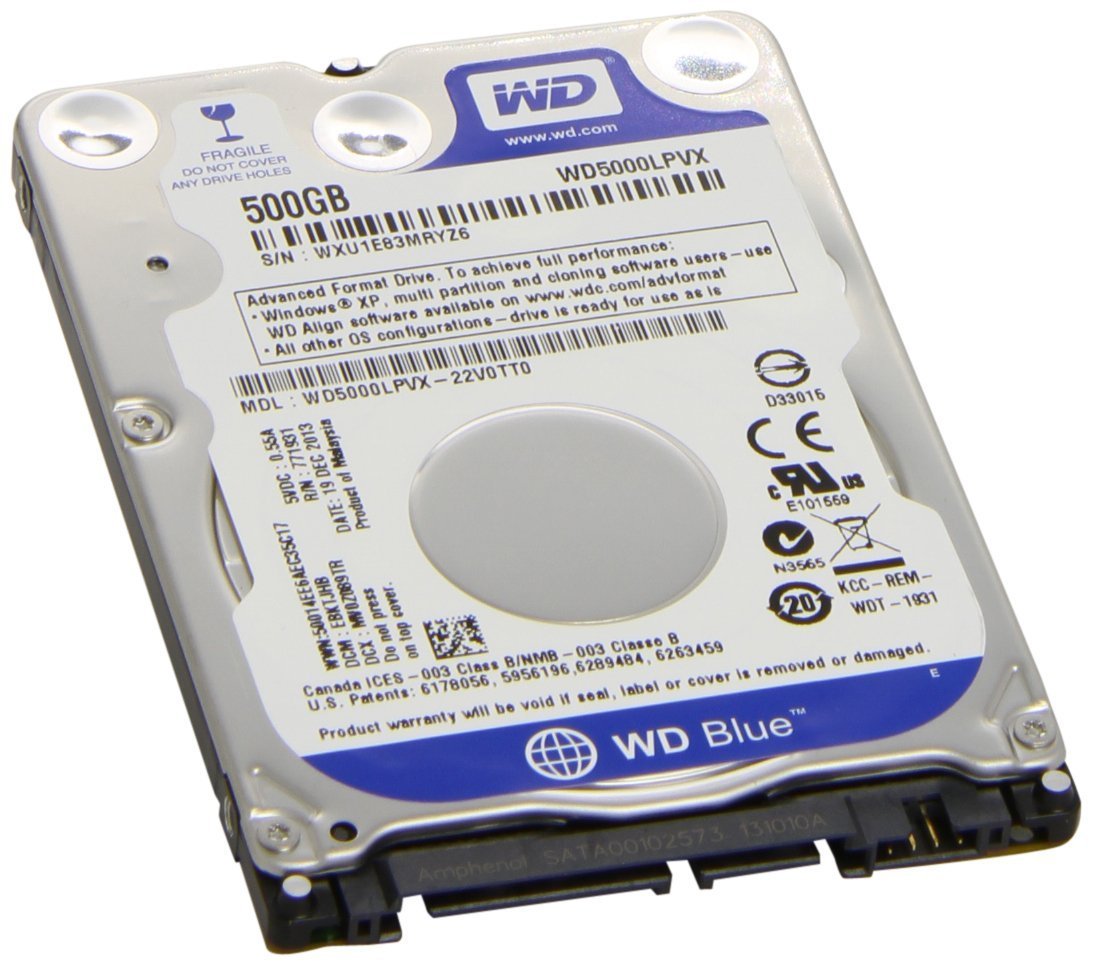
The Western Digital 500GB 2.5" Hard Drive is a versatile storage solution designed for PlayStation 3 and PlayStation 4 consoles. With a capacity of 500GB, it provides ample space for your favorite games, while its 5400 RPM speed ensures quick access and smooth performance. Weighing just 3.52 ounces, this hard drive is easy to install and built to last, making it a must-have for any serious gamer.
| ASIN | B00TIY4IHK |
| Best Sellers Rank | #17,938 in Video Games ( See Top 100 in Video Games ) #384 in PlayStation 3 Games, Consoles & Accessories #2,111 in PlayStation 4 Games, Consoles & Accessories #2,582 in Nintendo Legacy Systems |
| Brand | Western Digital |
| Customer Reviews | 4.5 4.5 out of 5 stars (2,092) |
| Date First Available | February 12, 2015 |
| Flash Memory Size | 500 GB |
| Hard Drive | 500 GB Mechanical Hard Disk |
| Hard Drive Interface | Serial ATA-600 |
| Hard Drive Rotational Speed | 5400 RPM |
| Hardware Platform | playstation 3, playstation 4 |
| Is Discontinued By Manufacturer | No |
| Item Dimensions LxWxH | 6.7 x 5.4 x 1.6 inches |
| Item Weight | 3.52 ounces |
| Item model number | WD500LPCX |
| Manufacturer | Western Digital |
| Product Dimensions | 6.7 x 5.4 x 1.6 inches |
| Series | blue |
N**I
Western digital 500gb HDD
Fixed my ps4 safe mode loop, great product, affordable and reliable, easy installation, ok noise level.
A**R
Item as described
Delivered on time. Worked as expected! My son’s play station is now working like brand new! Packaged well! Thank you for getting him back up and running!
R**N
Replacement PS3 hard drive.
Works perfectly for my PS3. And it was easy to install into the console but a little bit of work to get it actually working, but that was more so on Sony’s side. Either way I increased the capacity of my console by 2.5 at least so that’s good.
N**S
Works amazing with Laptop
Bought this for an older laptop that had an hdd issue. This fixed it. Amazing product and works amazing
S**S
A
Worked great
J**N
PS3 replacement = Excellent!
This worked perfectly. It fit right in the existing hard drive tray, literally took less than 5 minutes to swap out. The trick as others have said is downloading the PS3 update to a USB drive and uploading it to the new hard drive. 1.) Go to playstation.com and go to the software and updates section for the PS3 and download the latest software to your computer. 2.) On a USB drive create a new folder "PS3" 3.) Open the USB PS3 folder and create a new folder "UPDATE" 4.) Move the downloaded software file from your computer to the USB drive and put it inside the "UPDATE" folder 5.) Insert the USB drive into the front USB port of the PS3 and follow the instructions to update the PS3 I kept getting a error message on the PS3 stating it couldn't find a update file on the USB drive I had created and after doing research found the PS3 doesn't like or recognize some USB drives. So I used a different one and created the same steps above on it and it finally worked. Just don't panic if this happens, grab another USB drive until the PS3 likes it and it will work.
R**T
Worked Perfectly.
We still use our PS3 quite a bit, but the old 60gb hard drive was getting to be a huge limitation. So, I finally decided to upgrade the size to 500gb, and I am very happy with the results. It was confusing to figure out what brand and size would be best to order, but in the end I just felt more comfortable with a proven brand like Western Digital. I also did a LOT of research online and decided to stay within the recommended specs for upgrading a PS3 hard drive. I know a lot of people have used solid state drives, and/or have put in 1tb drives, but reviews seemed to be pretty mixed when opting for newer technology or bigger capacity. My analysis was that it seems like users have had better luck overall when staying with the 5200 speed, 500gb size. Also, I learned, as many other have, that that blue screw that holds the hard drive in place and the 4 small screws that hold the hard drive in the mounting bracket can be extremely difficult to remove. Please make sure that the screwdriver you use is a perfect fit. If it isn't, you may do what I and many other have done and strip the screw, making it a bear to remove. I ended up using a needle nose pliers to get a couple of the screws out - didn't think it would work, but luckily it did. Otherwise, just make sure you watch a few how to videos on YouTube that will show you the process and you should be up and running without any major issues. I downloaded all my PS3 information to a flashdrive, swapped out the hard drives, and installed the PS3 information onto the new hard drive. I would highly recommend the CNET video on YouTube. Very nice step-by-step instructions.
D**.
Worked great to give my PS3 slim more space!
Purchased this drive to replace my 150GB Playstation 3 hard drive, because I finally got to connect my PS3 to be able to download games off the PS Store! This hard drive came exactly as stated. However, when I purchased it, I couldn't tell if it was a brand new product, or a refurbished one. When I installed it, it definitely seemed like a refurbished one, because there seemed to be some data already on it. The PS3 formatted it, so I have no clue what that data was (since I did not have a way to read the drive outside of the PS3). So, take note that this is most likely a refurbished hard drive. I only had 40 MB of space left on the stock hard drive. I transferred all my data from the PS3 onto a 160GB flash drive (which took 5 hours). I then went to the Playstation website and downloaded the most recent System Update to the USB drive (this is a REQUIRED step when installing a new hard drive. You must follow the instructions on how to create the proper file folders on the USB so the PS3 can read it.) Then switched out the hard drive with this new one (using the PS3 instruction manual as a guide). You then turn on the PS3 with the thumb drive connected, and it checks for the update. After it installed, I recovered all of the data I transferred to the flash drive (another 5 hours to transfer), and I was back up and running, with everything looking just like before. All my data was there, and I had a lot more hard drive space! So far, so good! It seems to be running quick and quiet. If anything changes, I will update my review.
K**K
This best internal hardrive for PS4 in this price range Performance is good No lagging noticed Used for 1 year But I would recommend for going 1 TB My storage just filled and I had to buy an external hardrive
N**Z
Funciona muy bien en una ps3
N**O
Já foi entregue
M**R
اشتريته لبلايستيشن 4 و يحمل بشكل ممتاز
ض**ي
ممتاز ويشتغل سوني 4
Trustpilot
3 days ago
3 weeks ago