


Desertcart purchases this item on your behalf and handles shipping, customs, and support to USA.
๐ธ Capture every detail, relive every momentโdigitize like a pro!
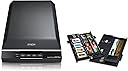
The Epson Perfection V500 Photo Scanner delivers professional-grade 4800 x 9600 dpi resolution with 48-bit color depth, perfect for scanning photos, negatives, and 3D objects. Featuring an automatic 35mm film loader and a versatile flatbed design with a 180ยฐ lid, it combines high performance with user-friendly one-touch operation, making it ideal for preserving your most treasured memories in stunning digital quality.
| ASIN | B000VYYSEE |
| Best Sellers Rank | #871,215 in Office Products ( See Top 100 in Office Products ) #78 in Flatbed Scanners |
| Brand | Epson |
| Color Depth | 48 bits |
| Connection Type | USB |
| Connectivity Technology | USB |
| Customer Reviews | 4.2 out of 5 stars 167 Reviews |
| Global Trade Identification Number | 05052461473478 |
| Item Weight | 4 Kilograms |
| Manufacturer | Epsonยฎ |
| Media Type | Negatives, Photo |
| Minimum System Requirements | Windows 7 |
| Model Name | V500 Photo |
| Optical Sensor Technology | CCD |
| Resolution | 9600 |
| Scanner Type | Document, Film, Photo |
| Standard Sheet Capacity | 1 |
| Wattage | 17 watts |
C**A
Flawless Operation
I used this scanner to scan approximately 1,000 photos over the course of about 2 weeks. It scanned without incident. The colors of the photos were cleaned up by the scanner and software. I bought this on clearance for $19 at a retailer, brand new in the box. I scanned all the photos and gave USB thumb drives to my family. A monumental task scanning all the photos, but well worth it to have them in digital format for emailing and such.
S**X
Epson V500 really makes the grade.
So far, I've really enjoyed working with the scanner - it's so much quicker than the scanners I've been used to. I haven't tried the negative or slide scanner yet but plan to when I get the time. I believe it was worth the cost and the wait.
D**N
Slide Conversion Project
I purchased this scanner to use on a very large 35mm slide conversion project. I had 6,000 slides to convert to digital format! The project took me over 4 months to complete while I fit it in between other work. During the entire time, the scanner worked like a champ!! It worked flawlessly and I was very pleased with it. All 6,000 slides have been converted as of today. I can't say enough good things about this scanner's durability, accuracy and quality. I'm very pleased with it and can strongly recommend it to anyone who wants a good scanner to convert slides to digital format.
M**N
Great
My mother in law gave me this for Christmas and I love it. It was so easy to set up and use. I am now obsessed scanning. As a former model before digital cameras were around, we used to have to develop and print only the best pic. I am now scanning my slides and negatives and loving the results. I will get to my personal photo albums next. It will be great to finally get rid of the huge box of albums I have. I will back it all up on CD's and carry that when I move!
J**R
Great, while it lasted.
The Epson Perfection V500 exceeded my expectations for a film scanner. I bought it to occasionally scan 35mm and 120 film. I'll use the reflective scan option to scan contact sheets and prints as well. I've owned the unit for one year and seven months and all of the sudden I'm getting a red line down the middle of the glass. Honestly, I would be surprised if I have 50 scans on the thing. Luckily the red line is out of the area where I scan film, but now it's useless for reflective scans because of the location of the line. I miss the days of buying new computer hardware because you wanted to upgrade, not because you needed to replace.
A**R
Don't buy from this vendor
I received the package on time and in good order. I had realized that I made an error with my order, so I repackaged it and returned it to the seller. I had to finally contact them to ask about my refund. There was some confusion about where it was returned, though I had a return receipt and gave them that information. They promised to take care of it, but they have not done so. They received the package on July 17th. I have e-mailed them repeatedly, but they do not respond.
S**N
Doesn't scan slides .
Will not recognize or scan slides. Followed directions in manual, on several websites, and various forums. Tried all the different modes, especially Professional....nothing. Nothing works. It just scans a copy of four slides sitting in the slide holder, but does not scan them individually.
B**K
loved at first, now useless
I loved this at first, but now I cannot use it. It started creating a vertical red line two inches from the left on my scanned images. If I scan anything, I have to make sure that what I'm scanning will fit on one side or the other of where the red line will show up. Epson has NO customer service--not even an 800#. I've found out that there's really nothing I can do but buy a new one. I'm going to go with Canon this time and hope for the best. Otherwise, it really did a great job before all this happened.
P**R
Good scanner - no reason to spend more
I bought the Epson Perfection V500 Photo Scanner to scan a large quantity of old slides and colour negatives. I originally looked at scanners dedicated to slides and negatives but read the reviews here for this flatbed scanner and went for it. I'm very pleased with the scanner itself, after having scanned nearly 400 slides over a few days and uploaded them to Flickr. The scan speed is not really an issue once you get going because you can alternate scanning with processing and uploading in batches of four. There is no point scanning at more than 2400dpi in my opinion as there is only so much information you can recover from a 35mm slide or negative. So this scanner does the job with results that are plenty sharp enough for an image 4000 pixels wide. I don't bother with any adjustments during the scanning process as it's much better to do this in Adobe Elements 9 that comes with the scanner. My only complaint is the software interface EPSON Scan, supplied. Each time you Preview you lose any adjustment settings you might have made (and saved) as the program reverts to Unsharp Mask after the Preview (actually intended to sharpen). If you are not careful you find that all your scans are made to this default setting regardless of any other settings made prior to Preview. Apart from that, the clunky software works well enough. The first V500 I bought from Amazon came with dust particles on the underside of the scanner glass so I sent it back (free) for a refund and bought another - this same scanner. Refund was done promptly by Amazon. It is perhaps worth knowing that the scanner glass can easily be removed for cleaning underneath but probably best left until the warranty has expired, as the manual states this should not be removed. All in all I am very pleased. Good product and good service from Amazon.
E**S
Perfect for the job!
I bought this unit, after checking widely on similar products, in order to begin the mammoth task of scanning my 1000+ slides collection (and some prints). So far I have successfully scanned something over 200 of them, with almost no problem. I have discovered that some manufacturers slide mounts are easier to scan than others; Kodachrome present no problems at all, also GAF (don't know who they are!) but Agfachrome can be a problem since the scanner "reads" any light appearing on its sensor as part of the scan. Because these slides are plastic framed (and so both sides are clipped together) it is occasionally possible for light to penetrate through the "clips". The result is that the scan includes the frame, not just the picture. I have yet to discover a foolproof method of correcting this; sometimes simply removing and replacing the slide cures it, sometimes turning the slide through 90 degrees has the same effect (the EpsonScan software allows the image to be rotated in Preview so that the scan is the right way round.) The supplied software works without problem - I was initially concerned since I already have an Epson Multifunction Printer installed that the two software installations might conflict; they do not. I have yet to need/use the supplied Scan and Stitch software (for larger documents.) One other thing that I have yet to fully "resolve" is how to remove the scanned slides from the unit without being in danger of touching the scanner glass! To scan slides a supplied frame is placed in the designated position and the four slides which can be scanned at a time are placed in it. Once the scan is complete the only way I have so far discovered to "safely" remove the slides is to slide the frame to the right hand edge of the plate, remove the frame so leaving the slides on the plate and then edge the slides carefully off the right hand edge until I can pick them up without leaving marks on the scanner glass. I suspect I will decide in the not too distant future that a pair of cotton gloves, or similar, might be a good idea! In terms of the quality of the scans, because I put the resulting images as slide shows on DVD or BD (Blu-ray) I have found that, for me, the trade-off between file size and image quality is best served for slides at 1200dpi for DVD, 2400dpi for BD, I always use the Professional Mode because this enables a visual preview of the scan. "Digital ICE", though it does slow down the scan time (typically 8 - 10 minutes for a set of 4 slides) greatly improves the outcome; "Color Restoration" is also invaluable, especially on older slides (some of mine date back to the 1970s) and sometimes "Backlight Correction". (The latter defaults to "Medium" settings; that seems perfectly adequate for almost all images.) I have not needed to use the "Grain Reduction" facility so cannot comment on this. Of the very few prints I have so far scanned 300dpi seems perfectly acceptable. All in all I am extremely pleased with this unit and would thoroughly recommend it.
M**E
Better than I expected, much better.......
Purchased to scan a collection of old photos, some 35mm negatives, and a whole bunch of 35mm transparencies. In all honesty I expected it to be very good at the photos and acceptable for the negatives and slides. I was wrong, whilst the photos were perfect, I was stunned at the quality of the slide (and negative) scanning, especially given that it is not a 'proper' slide scanner. You know the score, 'master of all trades', 'jack of none'. Well, in my humble opinion it did a fab job with slides.....and for the money, a bargain. Was also amazed how good colour slides from the early 60's looked, they looked like they were taken yesterday (unlike some of the photos). One other feature that I noticed was scanning multiple photos (I tried to scan four photos to crop up later in the supplied Photoshop Elements 9), is, that as long as they are separated by a small amount of space the scanner identifies the separate photos and creates multiple images (brilliant). I could scan 4 photos at a time and it created 4 images, priceless. ;-) Also the negative scanner can scan up to 2 strips of 5 at a time, for slides it is 4 at a time. In short a great product and well worth the circa 150 notes. So, whats wrong with it....? Nothing, it just takes a few minutes to set it up, and make sure you don't use the 'digital ice' for photos, as it caused a few issues, but worked perfectly with slides though. I assume you are not supposed to use 'ice' with photos? "DIGITAL ICE is also supported on Reflective media (e.g. photos), with the exception of the Perfection 4490 and ***V500*** models which are equipped with DIGITAL ICE Lite, suitable for scanning film and slides only - these models cannot be used to scan Reflective media with DIGITAL ICE. As an alternative you can use the Dust Removal feature for Reflective media." So, do not use 'ice' on photos then..... ;-) Well worth 5 stars......
O**N
MacPro + Snow Leopard compatibility - Just Great
Received the V500 3 days after ordering. I've had this scanner one day but wanted to share my experience quickly to all those Mac Pro (Early 2009) users who use Snow Leopard. I read numerous reviews for the Canon and HP scanners of this price range and finally selected the V500 because of its reported better quality scanning and ability to better handle multiple photo scans. Now, I have not had time to test the full functionality or quality of slide or negative scanning. With photo reflective scans it does a fine job at high speed tested over different setting and in auto mode. Online manual looked good and I like the way it allows me to control where scans are located on the computer THE DOWN SIDE and the reason I only give the V500 4 stars is the lack of good setting up documentation, and I don't really believe a product should be judged on its initial setup documentation. I suggest users DO NOT use the V500 CD-ROM if you are a Snow Leopard or Windows 7 user. There is a piece of loose paper (A5 size) included in the box that refers to these operating systems WEB SUPPORT Sites but Does Not tell you to go to these sites BEFORE installing from the CD ROM. I initially used the CD ROM and then looked at the support sites - WRONG - I had to uninstall all the software and reinstall using the Web Site procedures. THESE INSTALLATION INSTRUCTIONS WERE EASY to follow and allows you to install the Scanner drivers without the Epson printer drivers (this took an age from the CD). It was so simple, Epson should be more explicit about the use of that little bit of paper. I read the one star reviews that referred to the buttons not working on the scanner. THIS happens because the CD ROM was used and is not always compatible to the operating system. AS I found out too my cost in time. STILL An Excellent Scanner - I hope this review avoids potential buyers falling into the same trap I did.
F**N
Great scanner
I couldn't decide whether or not to send off my parents old slides to one of the companies that scans them for you or buy a scanner and do them myself. As I was likely to want to scan other things I decided to buy one. I always justify these decisions by saying to myself "well I can always sell it on ebay after I've done what I need to". I won't be selling this though. I'm not a high end user wanting the best possible resolution and there were more expensive scanners out there but as we use an Epson printer this scanner looked like a good option. It arrived the next day and the first thing I noticed was the quality of the finish. In matt black with a mirror black finish on the lid it looks fantastic. Loaded the software up on our MacBook Pro and plugged it in. I scanned the slides using the frame that comes with the scanner and hey presto there are the images safely saved on the Mac. The quality looks great given the slides are fifty years old now! Next I scanned an A4 photo that we had purchased from a professional photographer who wanted a kings ransom for the digital image. When printed we couldn't tell the difference between the two. This is a great scanner and I'm sure it does a lot more than we are going to use it for but if you want something that is easy to use, great to look at and gives brilliant results I would go for this again.
Trustpilot
2 weeks ago
2 weeks ago