🎨 Unlock your creative flow—precision, speed, and mobility in one sleek tablet!
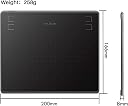
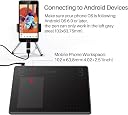
The HUION HS64 is a lightweight, portable 6.3x4 inch graphics tablet featuring a battery-free stylus with 8192 pressure levels and a 266 PPS report rate for smooth, accurate drawing. Compatible with Windows, macOS, Linux, and Android (via OTG), it includes 4 customizable shortcut keys to streamline your workflow. Perfect for professionals and creatives seeking high precision and mobility.


| ASIN | B07NY457J4 |
| Active Surface Area | 6 inches x 4 inches |
| Best Sellers Rank | 14,525 in Computers & Accessories ( See Top 100 in Computers & Accessories ) 39 in Graphic Tablets |
| Box Contents | Quick Start Guide |
| Brand | HUION |
| Brand Name | HUION |
| Colour | Black |
| Compatible Devices | Desktop, Laptop, Android Smartphone |
| Connectivity technology | USB |
| Customer Reviews | 4.4 out of 5 stars 1,645 Reviews |
| Display Type | LCD |
| Item Weight | 258 Grams |
| Manufacturer | HUION |
| Manufacturer Part Number | Huion |
| Model Name | HS64 |
| Model Number | Huion |
| Model name | HS64 |
| Native Resolution | 5080 LPI |
| Network Connectivity Technology | USB |
| Operating System | Windows 7 or later macOS 10.12 or later Android 6.0 or later Linux |
| Operating system | Windows 7 or later macOS 10.12 or later Android 6.0 or later Linux |
| Pressure Sensitivity | 8192 Levels |
| Pressure sensitivity | 8192 Levels |
| Product Features | Lightweight, portable |
| Screen Size | 6.3 Inches |
| Special feature | Lightweight, portable |
| Specific Uses For Product | Drawing, design, electronic signature, 3D modeling, animation, gaming, online education, remote work |
| Target Audience | Students, Teachers |
| Unit Count | 1.0 count |
E**N
EASY TO USE, GREAT VALUE FOR MONEY AND GREAT RESULTS
This is the first time that I've used a digital drawing pad so I have no benchmark. However, I cannot find fault with this Huion HS64. It's easy to use and works superbly. I'm up against a tight deadline to illustrate a children's book for a friend and with 146 illustrations in total there's a lot of work. I started working with pens, Indian ink and brushes but this was terribly slow and so I bought the HS64 to speed things up; it's not only done that hugely but has also improved the quality. the key to success is being able to exploit whatever graphics program one is using; in my case, that's Photoshop Elements 5.0. All aspects of the interface work. The best recommendation that I can give is to say that I wouldn't hesitate to buy the HS64 again, as a replacement or as a present.
J**S
A good tablet
Is a nice size, easy to set up and looks to be good quality. The pens is light and good to use, accurate and does not need a battery. the tablet is not wireless but that was not an issue for me. I just keep a cable plugged in to my desk computer and connect as and when required. I like the scroll bar on the side as opposed to a disc to rotate or buttons. This may be personal preference.
A**.
Good for everyday use, though occasional responsiveness issues
This drawing tablet works well for general use such as note-taking and basic digital writing. The pen is comfortable and battery-free, which is convenient for everyday use. However, I noticed that the pen occasionally becomes slightly less responsive, especially during faster writing or more detailed input. It is not a major issue for casual use, but it can feel a bit frustrating when trying to write quickly or during more demanding tasks. Overall, it is a good entry-level tablet, suitable for study and light creative work, but not ideal for fast or professional-level input.
D**S
Great tablet for price!
Great tablet, but you'll need a glove if you're left handed.
T**M
Great purchase
I bought this as drawing pad but it's so superior to a touchpad that I use it for all functions. It makes using the laptop such a breeze. I chose one which had excellent reviews in regards to its accuracy, and tbh it hasn't let me down
D**A
great product for the price but Windows Ink doesn't work
First, I think given how cheap the product is, this tablet is a pretty good choice. It would cost me over £80 but I purchased the tablet for less than that. I don't have much experience with tablets by whatever they have in offer seems to work as expected, apart from Windows Ink. The tablet worked out of the box, but drivers are required for further customisation. I tested the product on Adobe Fresco, Blender, Affinity, and didn't see any issue. I did not notice any delay with the pen and tilt is an excellent addition, which I did not even expected to have. The tablet can map either entire or part of the screen. Switching to another monitor is possible but there is a significant issue (see next paragraph). The pen seems very sensitive and easy to customise the pressure. Now, here are following reasons for 3 stars out of 5: customisation buttons seems too soft, the main program ask for permission to open up every time I boot computer, Windows Ink is not fully functional and only works on one screen. With Windows Ink on, cursor start flickering on the other monitor, which renders this tablet unusable with two monitors. If Windows Ink is off, everything works but then pressure is disabled. This is not a trivial problem. Hopefully they will sort drivers out in future. I would recommend the product for entry level art and just see how it feels to draw on pen tablets, but the tablet might not be suitable for more professional work.
B**G
Oh my beauty where have you been!!
For close on 3 decades I've been a slave to Wacom, their stupidly expensive tablets and buggy software. I used to dread Windows or Wacom updates as they'd delete everything I'd done to get the thing to work vaguely well ( and in some software it was near useless) So after my 5th dead (£70) stylus I thought I had nothing lose by trying a £54 tablet. Damn! Where have you been all my life! Plugged it in. Downloaded and installed the driver and .. it just works .. No diving into obscure windows services. No slightly paniced editing or the registry. No trawling through dozens of Youtube videos to try to figure out if I've missed one of a dozen or more steps No resigning myself to using the mouse for 50% of my work.. It just works. Like its meant to do. As you'd expect it to! Whats sad is that surprises me so much.
M**N
HUION New Inspiroy 2 L H1061P Graphics Tablet
A great product, good size pen glides over tablet smoothly. Like the scroll wheel and preset buttons. Use mostly for photo editing in Adobe Photoshop and Lightroom, which it works well with, had a few issues when using in Word but when I turned off WINDOWS INK in tablet control panel all OK. Very pleased with this and am now using it for everything much better then a mouse just have to get used to it. I was advised when starting to not keep switching between the two just stick to the pen after few days got on well with it.
D**I
Support Linux : 100%
Pour faire simple : cette Inspiroy 2 L est la meilleure tablette graphique que j'ai pu utiliser jusqu'ici sur Linux, en particulier pour son support Linux 100% effectif (ici, sur Fedora 38). D'autres ayant déjà décrit ici tout le bien qu'ils pensaient de la tablette en elle-même, je ne vais aborder que le support linux. 2 "pilotes" possibles : driver en .deb pour Ubuntu, ou en tar.xz pour le reste du monde. 2ème option retenue pour moi, c'est un script bash qui s'occupe d'installer d'autres scripts bash, l'UI, la udev rule etc. Temps total d'install : 5 min (et je compte le redémarrage de la machine). Tout fonctionne, y compris les groupes de boutons et leur customisation/réassignation. /!\ Attention toutefois si vous avez des configurations résiduelles d'autres marques ou d'anciens périphériques. Pensez à écarter ces fichiers de votre système (cela a interféré avec la tablette, et je n'avais pas de clic gauche avec la pointe du stylet !). Idem si vous utilisez le pilote Nvidia avec le script nvidia .run : pensez à le réinstaller également. En ce qui me concerne, cette tablette est un coup de maître de Huion. Well done !
L**A
Tableta gráfica, buena, bonita y barata
La tableta la pedí el jueves y el sábado temprano ya estaba en casa, estéticamente es muy bonita, es fácil de manejar y conectar, al igual que la instalación del driver para Windows, y para iniciar en el dibujo digital esta genial, muy recomendable
A**R
Stop overthinking — just get it!
As a former active Wacom user for over 10 years, I can confidently say that Huion is in no way worse — and in some aspects, even better. It offers excellent usability and build quality. The drivers work reliably (unlike Wacom). If you're choosing a graphics tablet and feel that paying $300+ for a well-known brand is too expensive, I highly recommend giving Huion a try.
D**I
Great Drawing Tablet
This is a great drawing tablet, for both beginners and experienced artists. It's easy to connect and setup, the pen sits nicely in your hand and it works flawlessly. You can use it with any software you like for a bunch of uses, like drawing and 3D art. I recommend this tablet to anyone who is looking for a great entry-level product!
V**Z
Excelente producto y buena relación calidad/precio
Compré esta tableta digital porque me estoy iniciando de manera profesional en el mundo del 3D en específico en la escultura digital, la compré sin mucha fe honestamente y me sorprendió lo buena que es (NUNCA HE TENIDO OTRAS NI TAMPOCO LAS HABÍA USADO) la primera impresión para mi al usarla fue su velocidad de respuesta y usabilidad, es muy fácil usarla y agarrarle el truco por primera vez. Trae varias puntas de repuesto para el lápiz, el lápiz no usa batería. También trae una pequeña pinza para sacar la punta del lápiz y un adaptador USB a Tipo-C en caso de que lo necesites usar. La app es bastante sencilla e intuitiva y está en español e inglés. En términos generales es muy buena. Pros: -Para iniciarse o para temas más pros pero buscando algo accesible es perfecta -Trae repuestos para el lápiz y el lápiz no usa baterías Contras: - El cable que usa para conectarse al pc es bastante regular de calidad igual que los conectores. Nota: Que el cable de conexión sea fabricado de materiales de baja calidad no quiere decir que sea malo, no te llevarás la tableta al desierto o a un safari en Australia, estará en tu escritorio sin moverse la mayor parte del tiempo así que no lo veo tan mal el detalle. Dejé una tarjeta de bus para que puedan comparar o ver el tamaño real de la tableta.
Trustpilot
2 months ago
1 day ago