๐ Unlock your networkโs full potential with open-source power and gigabit speed!
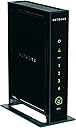
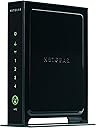
The Netgear WNR3500L-100NAS is a robust N300 WiFi router featuring a 480 MHz MIPS 74K processor, 128MB RAM, and 128MB NAND flash. It offers five auto-sensing Gigabit Ethernet ports for ultra-fast wired connections and supports popular open-source firmware like DD-WRT, OpenWRT, and Tomato, making it ideal for developers and enthusiasts. With live parental controls, guest network access, and easy setup via NETGEAR Genie, itโs designed for small to medium homes seeking customizable, secure, and high-performance networking.
| ASIN | B002RYYZZS |
| Antenna Location | Home, Small Office |
| Best Sellers Rank | #130,855 in Computers & Accessories ( See Top 100 in Computers & Accessories ) #2,583 in Computer Routers |
| Brand | NETGEAR |
| Built-In Media | WNR3500Lv2, Power adapter, Ethernet Cable |
| Compatible Devices | Personal Computer |
| Connectivity Protocol | Ethernet, Wi-Fi |
| Connectivity Technology | Wired^Wireless |
| Control Method | App |
| Coverage | Small to medium homes |
| Customer Reviews | 4.1 out of 5 stars 1,026 Reviews |
| Data Transfer Rate | 300 megabits_per_second |
| Frequency | 2.4 GHz |
| Frequency Band Class | Single-Band |
| Global Trade Identification Number | 00606449064988, 10606449064985 |
| Item Weight | 1.6 pounds |
| LAN Port Bandwidth | 10/100/1000 megabits_per_second |
| Manufacturer | Netgear |
| Maximum Upstream Data Transfer Rate | 300 megabits_per_second |
| Mfr Part Number | WNR3500L-100NAS |
| Model Name | WNR3500L |
| Model Number | WNR3500L-100NAS |
| Number of Items | 1 |
| Number of Ports | 4 |
| Operating System | Microsoft Windows 7, Vista, XP, 2000, Mac OS, UNIX, or Linux |
| Other Special Features of the Product | Parental Control |
| RAM Memory Installed | 128 MB |
| Router Network Type | hybrid |
| Security Protocol | WEP, WPA-PSK, WPS |
| Special Feature | Parental Control |
| UPC | 803982809582 606449064988 606449075038 |
| Unit Count | 1 Count |
| Warranty Description | Limited |
| Wi-Fi Generation | Wi-Fi 4 |
| Wireless Communication Standard | 802.11bgn |
| Wireless Compability | 802.11bgn |
S**R
New loyal Netgear customer
First we need to start here: D-Link DIR-655 Extreme N Gigabit Wireless Router That's the router I started with and I hope you read my review on it before purchasing one. Back to the meat and potatoes of this review. The Netgear N300 is exactly what I wanted: A new router to replace my already aging (5+ yrs) 802.11g router, but with USB connectivity so that I could use my external storage drive as a networked drive. The tech specs do most of the explaining, and the product delivers as advertised. For a very reasonable price, you get a wireless N router with plenty of features, expansion, and control. It has the ability to host a guest network with separate security protocols while segregating any communication with your primary network. This router is open source, so "retrofitting" the firmware and other customizations are possible. What I really like is the true network capability of USB connected devices. Where it differs from a true NAS drive is the speed of data transfer; however, this is an acceptable sacrifice for the lower price of integrating an existing drive. The hard drive is recognized by the router which has its own network framework. By default, the router creates a workgroup ("Workgroup") and a server path (\\readyshare\). This can be accessed by any web browser or through windows explorer. The default names can be changed to suit your own liking, and in the case of an external drive, the drive letter is automatically assigned (also changeable). Consequently, all I needed to do was map a network drive on the computer that was originally connected to the external hard drive. By doing this and assigning the same drive letter as before, all of my automatic backups continue to run as if nothing had changed. Now I have a true network storage drive, instead of a shared drive that required the first computer to be on in order to access the drive from another PC. The D-Link I mentioned above attempts to network the same drive by use of a utility application, run on one computer at a time. This is the equivalent of an electronic USB extension cord, and not what most of us were hoping for. I gave this router less than 5 stars for construction, because of its light weight and thin metal frame. This is actually a plus for mounting or placing on less than sturdy shelving or surfaces, but I don't expect the unit to stand up to much abuse. Not that I typically move my routers or subject them to any kind of abuse. I just thought it was worth mentioning in case someone has theirs on a floor or somewhere subject to tipping or squashing from above. Setup is a breeze with all of the most useful and accessed features listed on the left of the utilities screens. Every screen has applicable help information displayed on the right side. Range and connectivity speed are great. For those of you with issues, try changing your broadcast channel or transmit parameters (write down the original values first). Many times in urban areas, everyone is running similar default values which can interfere with one another, or you may be susceptible to some other form of external interference. Price is great. Considering mine was south of $80, I was able to get a new router, and a networked drive from existing hardware. I could have purchased a NAS drive and kept my old router and still spent more money. This is a very good mid-level router. Netgear has earned my business the next time I consider buying a piece of gear that they offer.
R**G
NETGEAR N300 Wi-Fi Gigabit Router (WNR3500L)
I needed a simple router for just the 2.4GHZ band that was capable of more than the minimum range so that I could provide coverage for a relative in their home. Since this relative just had a couple of devices, this router seemed like a good option so I decided to give it a try. Here is what I liked: 1. Nice construction! Very simple and straight forward design without any antennas sticking out. 2. Easy to configure. Basically, the unit configures itself. Security is enabled by default and the SSID (wireless identification) and password are provided to you on the wrapper for the router. 3. You only need to change the Administrative password, so very little that you actually need to do. 4. The range on this unit is very good. It was able to reach all of the rooms on this single story house of 1600 square feet. 5. It is simple enough that after I checked the unit and configured it on my network at home, I was able to mail this to my relative and all they needed to do was plug it in and connect one cable to their existing wired modem. They then found the network on their iPad, entered in the password and that was it, connected to the Internet!!! 6. It was basically the same process getting the TV connected wirelessly for Netflix and for Amazon Prime movies. Here is what I did not like as much: Actually, there is nothing about the unit to dislike. It is well designed and has lots and lots of features that a general user would probably never use. The wired network ports on the back of the unit are extremely fast if you need that type of thing. The wireless network is faster than the fastest Internet access that you can obtain as a homeowner in most parts of the country, so this is a definite win as long as you are NOT using this for gaming or for a large network. I would definitely recommend this router for anyone who needs a basic router with some nice features and medium range for wireless coverage.
S**H
62% slower wireless than wired
This product is very reliable, wired. Wireless, for those who may wonder why its rated at 100+mbs and don't see the full speed that they pay for, me being 25 MBS download and 5 upload from comcast. It's because my neighborhood is filled with people who have wireless routers. That's interference. If its midnight my speed does increase when others use their wireless router. I tested the speed at speedtest.net for both wireless and wired, on at least 20 different occasions and different router settings at different times to see what's the difference. Here is what i found. Speed: Wired- I consistently receive near max from my internet provider, 22-24+MBS download and 4+MBs upload Wireless- Its a 62% drop in speed for download with 14-16 MBS with 2-3MBS upload. The distance away from the router did not matter in the drop in performance. I also use a different router to see, The other netgear router WGT624 v4 performed worse with the wireless connection speed in a 75-80% drop in speed. Again, due to so many wireless routers around me. The range on this router is a comfortable 25 feet for me strong. So i recommend the router, for it does gives me a strong connection wired, and decent wireless. I can't fault the router for unreliable wireless speed when its due to the many wireless routers around me. Took me 10 days to figure that out, lol. The repeater function only works with another router that can repeat. I can not use the repeater function on the netgear Wgt-624 v4. The repeater works wirelessly. It takes the wifi signal of the base wireless router and repeats it forward just being plugged into the wall outlet. Both routers need the repeater function to work. And your speed will drop with the repeater router's signal. This router is more reliable with the speeds, but to get the best performance in the speeds, you need it to be Lan, a wired connection. Its the fastest. It's a deal in my opinion, and an upgrade in the strength from the previous model I purchased, and does not get as hot either. Update 8/09/2013 New comcast download speed- 55 Mbps Down 10 Mbps up. Wireless router stuck on dumb, I've isolated the channel, so its on the only channel around, next to the router, still can not push past 18 Mbps. I thought it was all the interference. Nope, the wIfi sucks. Wired I get 55-57 Mbps consistently. Go with a different Brand like Asus. Adjusted the router Fragmentation Threshold so now my Ping test wired shows 16 or less and 0% Packet loss from pingtest . net and yet, The Wifi Blows even when next to the router. Wired results shows nothing wrong with network or ISP Pingtest Results: Packet Loss- 0% Ping- 15 ms Jitter- 3 ms Speedtest result Wired: Download- 57.72 Mbps Upload- 11.12 This is NOT a Pebcak problem, but a Netgear Wireless problem. Remember, it was never a problem with the Wired.
B**B
A Surprisingly Good Midrange Router
I purchased this router 6 months ago in order to share an internet connection in my apartment between suitemates. Three of us share its capacity (5 computers, 3 phones, and a network printer). I'd say that I'm the only high-level, torrenting, gaming user of the bunch. So, needless to say, it's not getting the most intense workout. But that's also not what you're paying for here. You're paying for a stable router that's good enough for the average family, and with the WNR3500L you have that and more (man that sounds canned). Most people who buy a router simply plug it in, and let it do its job. Within that capacity, it's been fantastic. I have not noticed any dropped packets, or hanging. Any connectivity problems have been due to our old, SB5100 (motorola surfboard). The default firmware is acceptable. If you want more, by all means upgrade to dd-wrt (it's designed for open source). If I had the time, I would. But, at the moment, I'm a student with very little time available to simply upgrade my router on a whim. Having the capacity to do so is nice, and I may very well spend a day configuring it this summer. So far, though, the default firmware has been stable--and that's all that I can ask. You can have the router update itself, you can attach a USB drive, do port forwarding, etc. Something that I've found surprisingly useful is the USB port on this bad-boy. My room mates and I use it to share, erm, things that we find on the internet--definitely school stuff. You can also do backups. One of the problems that I've had with this router is its physical instability (it topples over easily). The base is very small, and, being a cheapish piece of hardware, there's not much weight to the device. When one of the three Ethernet cords hooked into it is given a slight tug, the thing will usually fall over. Being that it stands the way it does, its falling over is not surprising. That being said, if all things are static, this vertically oriented router will take up less desk/shelf space than a horizontally oriented alternative--and that was useful to me given that it is on my desk. It looks pretty sleek--though the physical appearance of my router often goes unnoticed by my house guests. What a shame. Something to be aware of--lights on the front can be a little bright. They also constantly flicker when a connection is working. If you have this in your bedroom, they can be noticeable when it's dark. They're not something that would wake you up in the middle of the night. They're just something that you might notice. I guess that they could bug people. Summary: Router works well, looks nice, hasn't had any problems so far, and I couldn't ask for more for the price.
J**N
Router failed after 3 months; horrific technical support
We purchased the Netgear N300 router to replace our aging (but highly reliable) Linksys for home; we have a number of streaming video devices that needed the extra computing juice of the Netgear. The product was easy to set up, and handled traffic seemingly without a hitch for two months. We began to notice, with increasing frequency, loss of connectivity at both the wired and wireless level. This problem was isolated to the router itself; swapping in our old, trusty router would always immediately fix this problem. Since we were having such tremendous problems with the router, I called Netgear support, located in a call center in India, about two and a half months after purchasing the router with the intent of securing an RMA. However, after more than an hour on the phone, the technician told me I would need to bring in yet another computer to test the networking issue; he seemed convinced (against all reason) that this was due to a networking issue with the computer plugged into the ethernet port. Despite my protests that this was a hardware issue, he proceded to ignore my request for an RMA and demanded that a second computer would be needed to test this issue before he would issue an RMA. Whil I did not feel that his request was reasonable (since all of the evidence pointed to a hardware issue with the router), I told him I would call back with the case number when I secured a second computer. I called back three weeks later with a second computer in hand. I spoke to a second technician, who indicated to me -- against all of the evidence to the contrary -- that there was nothing wrong with my router because all of the lights on the front of the unit were on. "So," he concluded, "it can simply could not be that your router is misfunctioning, sir, this is an impossibility." The technician went on to tell me that "we are very sorry, but we cannot issue an RMA because the unit is clearly not defective. This is a IP issue, sir." The technician then went on to state that the IP address issue would be simple to fix, but unfortunately my technical support for the router was 90 days and had expired, so that Netgear would only be able to fix this issue if I purchased a "technical support contract, sir, that will allow us to provide technial support for not only your router,but any electronics you own, even your blackberry, sir." The price of the support contract was $69.99 for 6 months, or $109.99 for 1 year. I expressed my outrage, indicating there was no hope that I was going to pay for such a contract when a new router cost $79.99. I told them that I believed that this was a hardware issue, and requested an RMA. The technician completely refused to honor my request, said he would transfer me to his technical agents for futher evaluabiton, and then the line was cut off. I have to say that I have purchased other products, such as a ReadyNAS, from this company; after this experience, Netgear has lost my business forever. I'd go so far as to say my experience with Netgear was one of the worst I've ever had with a vendor, and it felt like they were trying to run a scam. I'd urge those of you who are considering the purchase of this product, or other Netgear products, to take the technical support into your purchasing decision. Lest you think this is simply sour grapes, if you look through the reviews, you can see that I am not alone in my experience with Netgear customer service. Do you really want to deal with a company that treats its customers like garbage?
K**P
Best Router for the Money
I bought this router because of the price. The reviews were solid. This seemed to be the least expensive gigabit router with the best overall reviews. I have to say I agree. It comes out of the box with an older NetGear interface. Honestly though, once you get it set up, most people don't look back on it. I was afraid that it may be a bit of a pain to set up because of some reviews of the router on youtube and reviews of NetGear routers in general. I don't know what people were complaining about. Plug it in and press the WPS button and it works. The only other thing I had to do was restart my cable modem. Worked perfectly from the get go. I really like the guest network option. I will say the interface isn't as friendly looking as other brands. My only complaints would be more control over the guest network. That said, this is an open source router. If you want more control, you can easily load DD-WRT or Tomato on here. Once you do that, it is a control freak/tweakers fantasy come true. You can control just about every aspect that you would want to control, and several that you probably have no interest in controlling. Doing this is also pretty simple. Just a few steps, and you are off. Hardware wise, you may be better off getting the WNR3500Lv2 if you can get it at the same price because it has more internal antennae (8 vs. 3 in this model) and it has more memory (128flash/128ram vs 8flash/64ram in this model), and there is just as much support in the open source community for the v2 as there is this version. I've had very good luck with NetGear products. Last one I had never quit for 5 years, I just decided to upgrade. I can't say the same for Linksys or D-Link or Belkin - I have had to deal with & use in other locations (parents, friends, finace). They have not fared nearly as well.
J**2
This is version 1. Excellent default firmware, also supports tomato
I bought this router to replace my trusty wrt54g with tomato open source custom firmware running on it. Great router, but a bit aged, even with the enhancements of tomato. Reasons I used tomato: 1. Static dhcp (a.k.a. IP Reservation) 2. Improved throughput 3. Better control over port forwarding 4. Content filtering 5. QOS I selected the WNR3500L because I wanted a nice high performance router that is compatible with tomato and cheap (wanted that wireless N, gigabit, and faster throughput but didn't want to shell out a lot of money for a router). There aren't that many routers compatible with tomato: look to Asus RT-N66U (but not the N56U) if you want one better than this one, at many times the price. Anyway this router is among the handful that are really high performance and support the firmware I wanted. There are two versions of the WNR3500L. They use a different chipset. The version two has a faster chip and significantly more flash memory (and RAM). But the overall performance apparently isn't all that different overall between the two versions. Anyway, pretty much everywhere you look you will be getting version two. But this refurbished one is version one. Some people prefer version one because it is in some sense more compatible with tomato (or was...probably it just had a head start). Personally I would have preferred version 2. No big deal, though. They are very similar machines. Anyway, I plugged this router in to get it ready for the tomato install. It worked right off the bat with no configuration. Not a big surprise. But then I took a minute to look through the options in the firmware. IP reservation? Check. Convenient and flexible port forwarding? Check. Sophisticated QOS? Apparently, haven't tried it yet. It looks good, though. Content filtering? Also apparently. IPV6? Yup. Basically, this router appears to have all the features I want in the stock firmware. I'm getting great wireless N speeds, great connection speeds, got all my network IP's reserve, got some ports forwarded. Really, I'm not seeing a reason to install tomato. Maybe the days when custom firmware really added a ton to your router functionality really have finally finished. So here's the question: is there any reason to install a custom firmware? This particular router has been tested with dd-wrt. It adds some functionality, but the performance was significantly reduced. In general, tomato increases throughput over stock firmwares, but when the number of connections is high and there is up and downloading happening at the same time (ahem, bittorrent, ahem) the performance suffers more than stock. Personally I'm getting really hesitant to bother with it. I guess I'll just stick with the stock firmware for a while. I'll update this if I ever install tomato and let you know how it works out. Observations about the web interface: Pretty darn intuitive. There's an autoconfig option or you can config it yourself. IP reservation was equally easy, if not easier, than it was under tomato. Like all routers the actual loading of the interface pages is slow...not sure what that's about. It's true of tomato as well. Notice that this router also supports attaching a USB drive and basically functioning as a NAS. I choose to use a real NAS because it has powersaving options and so forth instead of just having the drive spin and spin. Anyway, not a function I will use, but some people may. To me it seems pretty neat. Anyway, I'm pleasantly impressed with this router. It was super, super cheap and it has great functionality, both in the hardware and in the software. If I want, I can later install an open source custom firmware. What more could you want from a router? Thanks Netgear. ======== Update ========== The default firmware has been performing well and stable for a long time, but I've decided to go ahead and overwrite it with tomato. There are two reasons for this: 1. You can't disable router logins through the WiFi. I consider WiFi to be really low security, so I don't like it that the router doesn't have the option to disable WiFi logins. Call me paranoid. 2. For some reason the receiving end of the VOIP has been cutting out about a minute into the call. I put the VOIP device on the DMZ, which did not help. I also tried disabling SIP ALG. Also didn't help. My VOIP is pretty important to me, so out with the onboard firmware. The first one was no big deal, but the second was a deal killer. To install tomato you first have to install dd-wrt because they come in different formats and the built-in firmware requires the kind dd-wrt uses. Then you use dd-wrt to install tomato. It's working great. The only downside is that I am no longer getting anywhere near the WiFi speeds I was with the built-in firmware. If WiFi speed is important to you, stick with the built-in firmware. In every other respect that I've seen, tomato is equal to or better than the built-in firmware. You puts down your money and you makes your choice.
C**O
Worked until the radio started failing (again)
This is now the second unit that has failed with the same radio issue and lack of DHCP addressing. The first unit worked for about 11 months then failed so it was replaced within the warranty. Now this unit has failed in the same way -- sometimes you can get WiFi to connect and get a DHCP address, most of the time no. Assigning an IP to a MAC address does not help and neither does any other trick I have tried (channels, speed, when cold, when warm, different security, firmware, etc.). The radio unit just fails after a while but sporadically will come back for a device or two here and there. Of course, these are cheap devices and far from the Cisco units I use professionally so I guess you get what you pay for but for home I do not need some crazy device, rather something that just works for a handful of devices and does not break in a few months -- is that really too much to ask for? The numerous reviews I read for this and the 3700 are similar when they fail. They work well when they work of course. I am not sure if a cheap Linksys is a solution either. I may just go back to an old Linksys 54G as it always worked but is not up to date anymore. Sad, that these sub $100 routers are just disposable junk filling up the local landfill sites. Update: 1/8/13. I recently picked up another 3500L (refurb) for under twenty dollars on Black Friday but I also found a deal on a cheap Netgear N150 router. In testing, the N150 was more reliable, had better signal range, newer interface (firmware), but throughput was less. I put the 3500L back into the box to use only as a backup or maybe to use as a switch only. it appears to be worth about what I paid for it this time. The N150 has been working great for the last several weeks and I plan to stick with it for now. Update: 7/7/13. The third unit has now failed in the same way with respect to the WiFi portion. It sure did not last long. Netgear junk three times in a row. Never using them again. I have to laugh at the Netgear comments as if they really care. All the resetting in the world would never fix faulty parts. Conveniently fails out of warranty every time -- good plan Netgear but find a new sucker since I am done.
Trustpilot
4 days ago
1 week ago