Desertcart purchases this item on your behalf and handles shipping, customs, and support to USA.
🚀 Elevate your productivity and play with the ultimate panoramic powerhouse!
The ASUS ROG XG49VQ is a 49-inch curved ultrawide gaming monitor featuring a 3840x1080 Dual Full HD resolution, 144Hz refresh rate, and FreeSync 2 HDR support. It boasts DisplayHDR 400 certification and 90% DCI-P3 color gamut for vibrant visuals, combined with ergonomic adjustability and ASUS Eye Care technology to reduce eye strain. Ideal for professionals and gamers seeking immersive multitasking and smooth performance, it also includes a free 3-month Adobe Creative Cloud subscription.


| ASIN | B07PZR2YY4 |
| Adaptive Sync | FreeSync |
| Additional Features | Blue Light Filter, Curved, Height Adjustment, Pivot Adjustment, Swivel Adjustment |
| Aspect Ratio | 32:9 |
| Best Sellers Rank | #15,608 in Electronics ( See Top 100 in Electronics ) #463 in Computer Monitors |
| Brand | ASUS |
| Brightness | 1541.7 lm |
| Color | Black |
| Color Gamut | 1 |
| Connectivity Technology | wired |
| Contrast Ratio | 1000:1 |
| Customer Reviews | 4.4 out of 5 stars 892 Reviews |
| Display Resolution Maximum | 3840 x 1080 |
| Display Technology | VA |
| Display Type | LED |
| Global Trade Identification Number | 00192876169353 |
| Hardware Connectivity | DisplayPort, HDMI |
| Image Contrast Ratio | 1000:1 |
| Included Components | DisplayPort cable, HDMI cable, Power adapter, Quick start guide, VESA mount kit |
| Item Dimensions D x W x H | 20"D x 46"W x 13"H |
| Item Type Name | ASUS ROG Strix XG49VQ 49” Curved Gaming FreeSync Monitor 144Hz Dual Full HD HDR Eye Care with DP HDMI |
| Item Weight | 21.4 pounds |
| Manufacturer | ASUS |
| Model Name | XG49VQ |
| Model Number | XG49VQ |
| Mounting Type | Wall Mount |
| Native Resolution | 3840x1080 |
| Number of Component Outputs | 2 |
| Picture Quality Enhancement Technology | TÜV Flicker-free TÜV Low Blue Light VESA DisplayHDR 400 AMD FreeSync Premium Pro |
| Pixel Pitch | 0.31 |
| Power Consumption | 47 watts |
| Refresh Rate | 144 hertz |
| Resolution | FHD 1080p |
| Response Time | 4 milliseconds |
| Screen Finish | Matte |
| Screen Size | 49 inches |
| Screen Surface Description | Matte |
| Specific Uses For Product | Business, Gaming, Personal |
| Total Number of HDMI Ports | 2 |
| Total USB 2.0 Ports | 1 |
| Total USB 3.0 Ports | 2 |
| Total Usb Ports | 2 |
| UPC | 192876169353 |
| Viewing Angle | 178 degrees |
| Voltage | 100240 volts |
| Warranty Description | 3 Year Warranty with ARR |
| Warranty Type | 3 Year Warranty with ARR |
D**A
Life-Changing Monitor for Work
I almost never write reviews unless something is really bad, or really good. I’m not a gamer, and i won’t ever game on this at all, so I can’t speak to anything related to all the extra features or experience around that. I do a little programming, creative (no video work), and a lot of email, spreadsheets, and office-type work. I run a business and had a 2-monitor 24” set-up. They were cheap monitors I bought 4 years ago, and one of them died. It was a pain using the one monitor, so I started doing some research. Because I’m not a gamer, I don’t have some expensive rig or an amazing laptop. I’m running the Surface Laptop 3 through the Surface dock 2, and everything runs great. I wasn’t sure if this would work well or not, but so far, no issues. Going from a 2-monitor set-up to this is absolutely incredible. I was very skeptical at first, but the ergonomics and the continuous screen (you can split this monitor into 3 separate workspaces) is life-changing. My productivity has increased by 25% with this monitor, and it’s easy on the eyes (pun intended). It doesn’t have ambient RGB lighting or a 1440px vertical resolution, but I was coming from a 1080. There’s some slight ghosting with some text, but it doesn’t bother me at all. I think if I was coming from a 1440 to this, I might be disappointed, but I’m nothing less than ecstatic to have this in the office. The one thing that bugs me is that the stand isn’t symmetrical. Still haven’t gotten used to that yet.
S**B
good
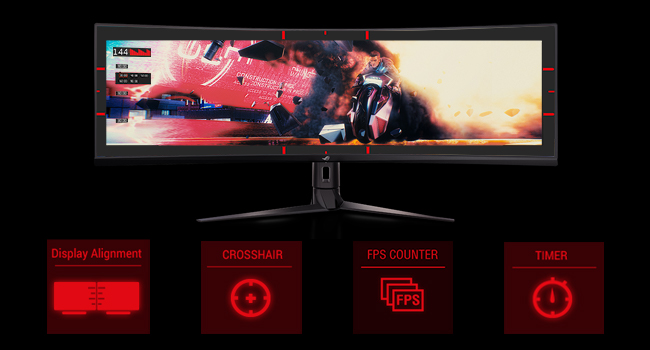
i ordered one of these monitors, got excited as one gets with new parts for a pc build them had it shattered when it arrived. it was pretty depressing but amazon did a fast sending of a new one and it arrived the same week. second one has worked great and no problems. no problems with the monitor itself but i noticed some games have yet to fully support this screens native resolution , namelly borderlands 3. gameplay works fine with wider field of view like one would want from a wide monitor while gaming, but the map doesnt fully work as the map and a few other screens in the game are non scrolling and cant be viewed forcing me to drop the game resolution to 1920x1080 or lower, just to interact fully . but thats not a fault with this monitor itself, i just wish the screens resolution was supported more with some games. but for normal activities this screens great and the extra features are novelty to me as i dont use most of them at all like the fps tracker,dot sight for shooters and blue screen filter. but im sure they would be nice additions to others as they do work.
J**A
Nice Monitor
Although I am a gamer and have a separate gaming rig and monitor, I purchased the XG49VQ 49” for editing pictures and updating digital signage. It replaced two out of three 24” monitors. Once I installed and configured the Asus Display Widget, I was able to utilize the Multiframe feature where you can drag a window and have it snap into a predetermined frame. It even works with the second existing 24” monitor. Overall, I am happy with the performance and picture quality. I am using the Display Port on my Lenovo PC with the stock on board video card. Looks like all the pixels are fine and I had to put sunglasses on until I adjusted the settings. :) The desk mount base is large but very sturdy and the height is adjustable. It actually takes up a bit less space than the two 24” monitors it replaced. The box came in very good condition and was extremely well packed. I really like that you could leave the monitor in the box and attach the desk mount. Very well thought out. For those that are worried about it sitting outside until you get home, I had it delivered to the receiving dock where I work and the box just fit in the back seat of my 2019 Malibu. The only regret is I didn’t order a 27” monitor to replace the last existing 24” monitor, it looks so tiny next to it.
B**.
Excellent Non-RTX4090 Gaming PC Monitor choice
Computer Spec: AMD 5700X CPU, AMD 7900XT GPU, 32GB RAM, 3840x1080 @144Hz Why buy this: - Play games in Ultrawide with two little side edge partitions for Discord and watching Twitch. It's so clean. - 1080p resolution; If you don't have a RTX4090 you can't drive an Odyssey G9 DQHD at anything more than ~40fps on High Settings in most AAA games. Whose paying $1500 to play at 40fps? - You need two monitors and like the idea of one big workspace. It's INCREDIBLY impressive when you sit down in front of this monitor. Why you shouldn't buy this: - You have a RTX4090, you should buy the Samsung Odyssey G9 - You can't afford it - You're ok with 60+FPS; get a single 27/32" 2K panel. It's a couple more pixels (~900k) so you'll lose some FPS compared to UWHD but that's the trade. Notes: - Wondering how you break up this monster into 2/4/8 windows? Windows Powertools FancyZones. It's free, made by MS, and works well. - When I bought this monitor I had a NVidia 3080, which had the juice to run UWHD at ~90fps. This specific monitor HATES G-sync on, massive blue ghosting around anything moving. Turn G-Sync off, get screen tearing. I sold my 3080 and bought an AMD7900XT, god's gift. No tearing with Freesync, no ghosting with Freesync on. Final Thoughts: You should get this monitor. It's an absolute delight and doesn't need a $4,000 rig to push130fps average in Cyberpunk 2.0 on Ultra with R/T Off. I mean, you still need a $2,000 rig but that's PC gaming.
J**Z
Serious disappointment from ASUS
As an avid ASUS fan, it really pains me to have to write this review, but the ASUS ROG Strix XG49VQ is a mediocre product (at best) in a sea of otherwise stellar top-performance gaming monitors, peripherals, and devices from the ASUS Republic of Gamers brand. While my monitor did not have the noticeable physical defects that other reviewers reported having, I did notice a few big problems that are worthy of calling out: 1. This monitor is technically an HDR display, but it's on the lower end of the clinical definition of HDR, and you will notice some challenges in achieving your targeted brightness because the range just isn't there. This is an HDR4 display that masquerades as something more sophisticated, but most games today that really take advantage of HDR will benefit from HDR8 or HDR10. Given how dull the lows are and how blinding the brights are in HDR4, you're going to be better off playing without HDR on in this model. Finally, if you have HDR on, you can't adjust your GameDisplay settings - it has to be off to make those changes. 2. Low Resolution - This is a FHD vertical display (and think of it as two large 1080p monitors joined horizontally), which means that if you are used to gaming on 1440p or better, you're going to notice the downgrade. But given the size of this monitor at 49", you can actually see all of the pixels. This wouldn't be a huge deal, generally, but the monitor's rendering engine engages in some weird sharpening effects (that do not seem removable) that make the text look aliased, regardless of your AA settings. The SDR calibration of this device looks like an actual firmware or hardware implementation rather than something you can adjust. 3. Physical Imperfections. While my device did not have strict "defects," there was definitely LED backlight bleed that exacerbates some of the HDR dysfunction previously mentioned, and probably contributes to some of the SDR over-aliasing that renders games at 1080p really jagged. And other posters are correct that the plastic on this monitor feels cheap, rushed, and likely to break or chip with any typical wear-and-tear. 4. Non-Premium. ASUS is known for building gamer-centric devices, but there is a very spartan implementation for this monitor, with no AURA or LED lightning, and not even casing elements that are stylish or luxurious. Instead, just a plain, black monitor implementation. Also, there is an eye-sore of a promotion on the right side of the monitor's bezel "Designed and Made by ASUS in Taiwan" in silver lettering that is visible half-way across the room. Who wants to see that? By and large, this monitor is not a "bad" monitor - especially for people who have never experienced variable refreshrates (FreeSync 2 does work, but with NVIDIA cards expect a lot of flickering and incompatibility - so as of the writing of this review, it generally only applies to AMD cards), or for non-gamers looking for a productivity workspace - but the price-point at ~$900 really justified something better thought out and put together. I returned my monitor after just four days of use, when the physical imperfections, LED backlight bleed, HDR dysfunction, and SDR over-aliasing rendered the limitations of this glorified 1080p panel too much to bear. Best to save your money and go deeper for a 4K solution, or use one of ASUS' excellent 1440p 34" Curved Panels instead.
A**E
Looks like a billion bucks
I have a 2080ti, was upgrading from a triple 1080 monitor setup where i wanted to position this as the "curve" between the two. Honestly the field of vision is so wide I have to physically turn my head to focus on the other two monitors. I don't really even need them anymore but it all looks so cool together. As for performance I was able to get Gsync going and my games look/play great at full resolution with HDR and Vsync enabled. I mostly play Warframe and I was in complete disbelief the whole time. For the price I cannot believe the performance. My desk looks like I have a $10,000 setup. When people come over they gasp. My gripes are as follows: In HDR mode, text looks crunchy. I enable HDR mode in games but not in Windows. I don't know if this is a driver thing or what. If anyone has a fix for this let me know. And the controller is just totally whack and unpredictable. After you set it once you won't want to touch it again. There are two additional buttons near the joystick that almost make it tolerable but it's no LG control scheme. I ended up buying a 3rd party VESA swivel stand which cleared the entire space under the monitor for my headphone amp. The monitor is heavy but not too much. I'm impressed it only took a small power block, usb 3, and a single DP cable to power it. I thought I was going to have to connect multiple HDMI cables to it but nope! Overall it's the best monitor I've ever had, and completely puts my 60hz 4k LG OLED to shame for gaming. The color isn't as rich but for the price this is a steal. I'd buy two more but they'd be sticking off the sides of my desk.
C**Y
Love it
Packaging: Packaging was nicely packaged, has a cut out on the side of box for easy removal to add the backbone of the stand making it easy to lift out of the box with one person. Installation: After the intial setup, it flawlessly connected much easier than the previous Asus monitors did which was likely a driver issue. This time connected and was up instantly. Gaming: Immersive! The target audience being a gaming pc, it delivers, amazing graffix in game using nvidia 1070 gpu, equally as important than the monitor its self from my experience using onboard graffix and less than effective graffic cards on any gaming monitor. Workstation: Having been in the IT field, I would not prefer this over other monitors for tasking that are intended for productivity. If you are some what of a tab/alt/arrow/windows key ninja it wont make much of a difference imo, im just loving the full screen without the 1" bezzel down the center...Its not a workstation directed pc, using for network topologies, putty and studying to videos is amazing to say the least, having no bezels in games and school is worth 5 stars to me. I wouldnt of chosen this for work after have seen other 49" monitors that are much more in cost. Overall: Im very impressed, using it with 2x28" asus monitors in tandem side by side on the second graffix card, they look great and have the monitors color, brightness. Contrast blend very well after messing with the monitor settings for awhile. Havent gotten into the software yet. Sound: They should stop adding speakers in high end monitors, not to be unreasonable, but removing a physical feature 99% of us dont care about, just makes the monitor heavier. Curious to know if anyone choses the speakers on a $900 monitor over $50 speakers from walmart that far outweigh the cheap speakers that come on expensive monitors.
S**X
Love this thing!!!
Before I get into the review, I had the Samsung Odyssey g9, which was supposed to be the top at the time. They are so sensitive I and to replace one right after getting it, and the other I had for about a year and a half and something barely hit the corner and the whole screen went out. For the money I was not impressed, never seemed to get it bright enough for the sun light coming in my side window, no speaker for $1400 and a few other things. Now to this one, I bought this as a replacement, read the reviews that my previous monitor was better. But personally, I like this one way better than the Odyssey g9. The screen on this too bright, I have to turn it down, even with the sunlight coming in the side. I like the ASUS Display widget that lets me put up the red dot when playing video games. I have seen no performance difference gaming between this and my previous other than when I set a game to us 144mhz, the screen color and brightness stay the same, for some reason when I would put 240 MHz on the other one, it would dim lower. Again, it's my opinion, but I have had both, so you can save yourself about half the money in buying this one, and you will not be disappointed.
J**R
Absolute unit.
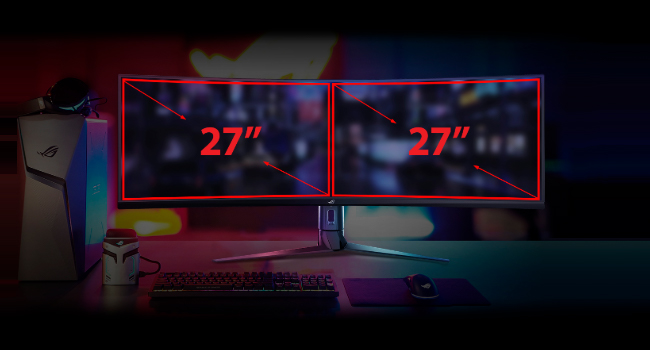
TL;DR/Key-points: This is a "super ultrawide" monitor. Dual 24-inch screen equivalency. Matte black finish over majority, gloss in areas you don't usually touch/look at. Thumb stick for menu navigation. 144Hz, 90% gamut. Not nauseating. HDMI and DP, cords included. Has power adapter and long cable. Comfortable curve. Adaptive-sync and Freesync supported, but not G-Sync. Full review Matte black finish over the vast majority of it, and the only gloss areas are in places you'll never touch. Screen has a very comfy curve and I haven't seen any glare at all. This thing has the usual ASUS tilt stick for the monitor settings menu which feels extremely natural, and is why I can't use any non-ASUS monitors unless they have it. Monitor comes with a lot of very helpful settings such as a few on-screen crosshairs for a big but ethically questionable advantage (as if that matters lol). The refresh rate is 144Hz so while the size may strain your neck a bit from looking around so much, your eyes will feel fine and it won't be nauseating unless you play at a low FoV. Some games don't work very well with a screen this wide due to improper game coding (I.E. stretching at the sides, compression in the middle), but games that are made right will look and feel GLORIOUS. Browsing the web can be a bit annoying for websites that have their content locked to the left- or right-hand sides, but sites that have centered content are a dream. The new mobile-like layouts will finally make sense to you. This monitor type is called a "super ultrawide", or a "doublewide" because it's the equivalent of two 24" screens joined together without the bezel. If you want the equivalent of two screens but don't want two monitors, or if you just want a lot of one-screen real estate, this is definitely the monitor for you. Keep in mind that the screen is almost 4 feet long and weighs like 50 pounds when considering it. The stand itself is about 2 feet wide and a foot long, so make sure to measure to see if you can fit it. Overall, it's a fantastic monitor and I can't see myself using anything smaller willingly. I don't like to give out 5-star reviews unless it's deserved, and this behemoth deserves a 5-star review.
E**.
PUBLICIDAD ENGAÑOSA DEL ARTICULO
BUENAS TARDES, LA PUBLICIDAD DE ESTE ARTICULO ES ENGAÑOSA, LA FECHA GARANTIZADA DE ENTREGA NO SE CUMPLE!
M**Y
Great Gaming Monitor.
This monitor is amazing. Crisp images, brilliant accurate color rendering. Fast response time. The wide 3840 X 1020 resolution is perfect for gaming especiallly for gaming where periferal view adds to the immersion and playablility in MMORPGS, Racing Games, Shooters ... you name it. The fit and fiinsh are excellent as is the way the rear of the monitor hides cable and connedtions for a clean quality look. 5 out of 5 stars for sure.
E**.
DO IIIIIIT F-ing DO IT!!
F-ing brilliant!!!! It's THE best purchase I've made in the last 4 years. Epic picture quality, epic size, epic aspect ratio, epic support, epic integration. Simply put...it's EPIC. Sports look amazing! Games look incredible! It's not for everyone, it takes a bit of willingness and know-how to get it set up to your specs but I have been using it to play games, watch sports and edit music and it is a complete work station. They market the monitor as a 2*4k 27" monitor but it feels like 3. The curve is INTENSE and requires you to sit 1-1.5 feet back from the screen but this only adds to it's majesty. I am in awe of this monitor and it's sleek design BUT buyer beware...KNOW YOUR NEEDS!
A**R
Don't Despair, perform a Reset All and don't use HDR
I was excited to add this monitor to my existing array of monitors (5 others), where this monitor was to replace an older monitor that was starting to fail. I loved the quality of this monitor, being 49", it's a heavy beast but I managed to carefully pull it from the well packaged enclosure and connect it to my system. The first thing I saw was a red dot, smack in the center of the display and compared to all other monitors, the display was very washed out. Instead of returning the unit I called their support line and they were able to talk me through reset of the unit. That worked to eliminate the red dot, and when I removed HDR from Windows and the unit, the image looks amazing. So don't despair, if you have the same issues, it's likely just a reset (slight config changes) away from working like you'd expect. I am a software developer, so having this wide canvas is something I very much appreciate and should come to enjoy over time.
Trustpilot
1 month ago
4 days ago