Desertcart purchases this item on your behalf and handles shipping, customs, and support to USA.
🚀 Elevate your WiFi game—never miss a beat or a meeting!
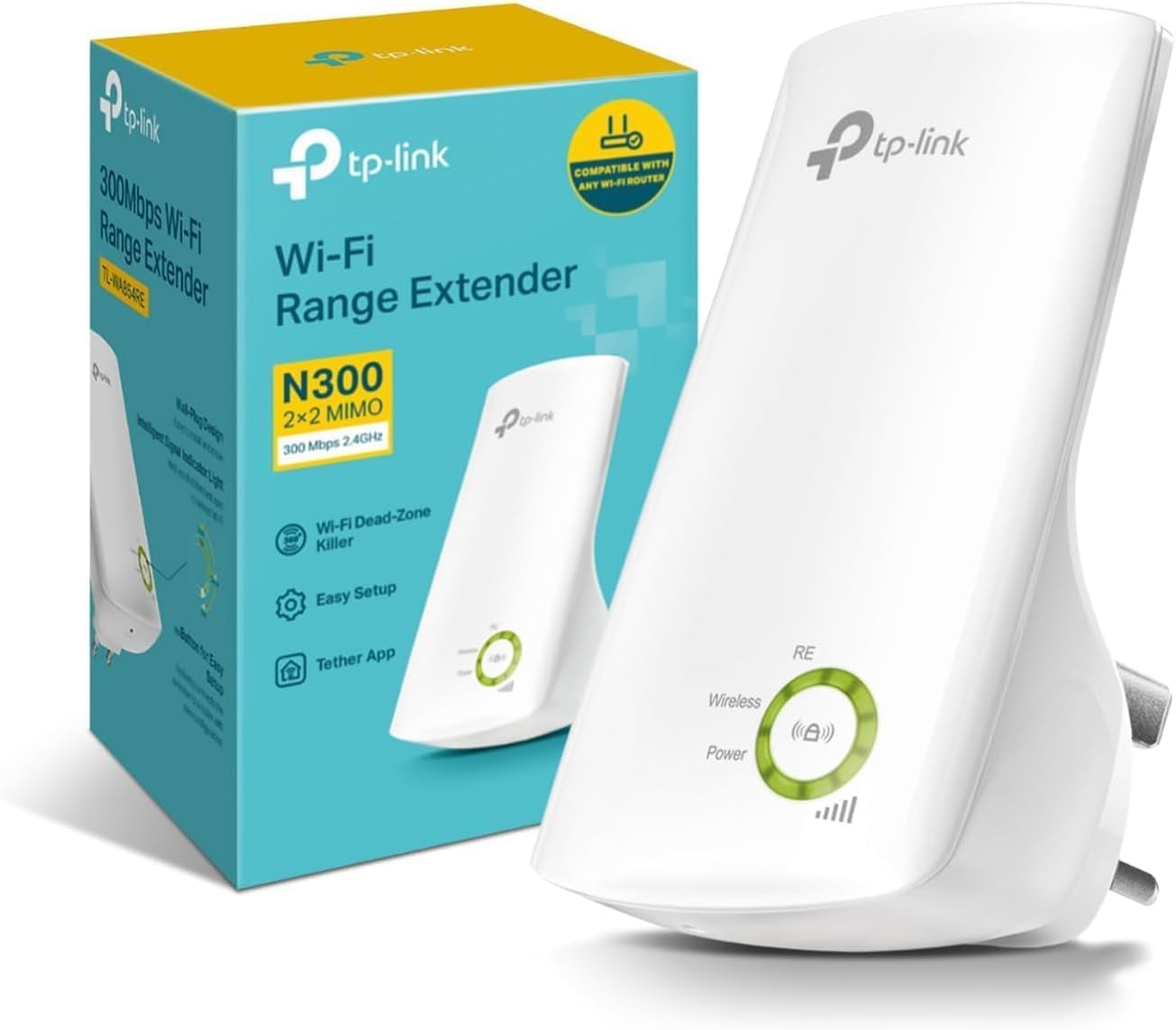
The TP-Link TL-WA854RE is a sleek, compact WiFi range extender delivering up to 300Mbps on the 2.4GHz band. Designed for professional and home use, it supports dual modes (Repeater & Access Point) for flexible network expansion. With universal compatibility, smart signal indicators, and app-based control, it eliminates dead zones and boosts connectivity effortlessly, making it ideal for seamless 4K streaming, gaming, and video conferencing across your space.


| ASIN | B07PKX1ZD1 |
| Best Sellers Rank | 416 in Computers & Accessories ( See Top 100 in Computers & Accessories ) 6 in Network Repeaters |
| Box Contents | 300Mbps Wi-Fi Range Extender TL-WA854RE, Quick Installation Guide |
| Brand | TP-Link |
| Brand Name | TP-Link |
| Colour | White |
| Compatible Devices | Works seamlessly with all 802.11 n/g/b wireless devices. It is also compatible with the latest Windows 8 operating system. |
| Connector Type | RJ45 |
| Country of Origin | China |
| Customer Reviews | 4.1 out of 5 stars 21,073 Reviews |
| Data Transfer Rate | 300 Megabits Per Second |
| Data transfer rate | 300 Megabits Per Second |
| Frequency | 2.48 GHz |
| Frequency Band Class | Single-Band |
| Frequency Bands Supported | 2.4 GHz |
| Frequency band class | Single-Band |
| Item Dimensions D x W x H | 6.6D x 6.7W x 11H centimetres |
| Item Type Name | TL-WA854RE N300 Universal Wi-Fi Range Extender |
| Item Weight | 0.09 Kilograms |
| Manufacturer | TP-Link |
| Manufacturer Part Number | TL-WA854RE |
| Model Number | TL-WA854RE |
| Range | up to 100 meters |
| Smart Home Compatibility | Smart Home Compatible |
| Special Features | One-touch set up with APP Control |
| Unit Count | 1.0 count |
| Wireless Compability | 802.11b, 802.11g, 802.11n |
| Wireless communication standard | 802.11b, 802.11g, 802.11n |
C**E
Superb and effective extender/booster.
An updated extender from my last one. This time, using the QR code and downloading the app, it's relatively easy to connect, without messing with the router. I managed to follow the instructions shown on my phone and connected successfully. When I now look at my phone's WiFi connection, it shows the extension connection as well as other devices. The WiFi appears stronger in the weaker areas and it shows a strong signal by the lights illuminated on the apparatus. It's a good piece of equipment for the price. It works well, enough for me to connect to the WiFi when I am at the bottom of my 100 foot garden. It's a great purchase; and for me, it works really well!
J**D
Great simple product.
After having issues with signal strength to some new items bought and done research I decided to buy a wifi enhancer. As a senior non tech person this product was easy to set up and get working. Instructions are simple and easy to follow. Once logged on to your router, position extender where suggested or nearest to item(s) you want to improve wifi signal strength to. Job done. So far all working as indicated. Good value for money product.
T**N
Works well
Easy to set up works well on our old thick stone walled house. Better than other brands
M**D
Useful boost
Internet kept dropping out on teams calls. This has helped a lot. Useful boost. Easy to set up. Already had an older one that let us use Internet in the garden. Just placed this one on the office mid way between old one and Internet box
J**S
A basic WiFi extender.
We used to get WiFi dropouts in our upstairs master bedroom. This was frustrating, as despite having a connection frequently we would encounter buffering and disconnects. So I decided to pick up this low cost extender. TP Link are a well respected brand amongst networking and this is their entry level model. This particular model is 300mbps and limited to the 2.4ghz band. It comes packaged in a small cardboard box with minimal excess packaging. The device itself consists of a 3 pin plug and a body that extends outwards and upwards with the antenna inside. The sports a green ring of LED's that are used to show status and signal strength, with a pairing WPS button in the middle. On the base of the device there is a small hole with a reset switch beneath. The extender isn't too bulky but you may experience issues with clearance with some sockets particularly when used alongside plug in PSU's, and in confined spaces. The extender is fairly easy to setup. You can just use the WPS button on your router, connect via a PC or use an app. Annoyingly it uses a different app to TP links Tapo range of smart products. It would be nice if these were integrated and allow it to be switched remotely by Alexa. As this doesn't support mesh the SSID will need to be set to something different and switched on your device. . In operation it displays the current WiFi signal and setting can be adjusted via the app or from a PC. So how does it perform? Pretty much as it should do. It solved our deadspot problem and we didn't experience any drop outs. Since then we have changed our router and it has essentially become redundant. Comparing it to our new router at the same range there is a slight drop in speed at 2.4ghz. Now I plan to use it to extend the WiFi to the shed and garden. It does pretty much what you expect it to at an incredibly low price. If that's all you need then great. However for not a lot more you can buy an extender that retains your socket and adds an ethernet port. A little again and you can buy one that adds the 5GHZ band and is capable of meshing. So consider what you need before buy and check what's on offer.
P**E
Does exactly what it should
A super cheap and easy way to extend the range or your 2.4Ghz wireless network, and it's decent looking too. All you have to do here, is plug it in, download the app, open the app, and follow the instructions to add the device to the existing network. The obvious way you can use these is to give your current wireless network some extra range. The device and app work together to let you know how far you should place the device to optimise your extended connection. For example, if you place it too close to your existing router, you'll have a super strong link between those two devices, but you won't necessarily be extending your existing network as much as you could be. On the other hand, if you place it too far away in an attempt to stretch your network as much as possible, you risk the connection between your router and the TP link extender being weak. So the app does an amazing job of actually letting you know if you would benefit from moving it further away, or if you're too far out. Another use for this extender is one which I think is perhaps becoming a bit more common these days, and that's for allowing more devices to connect to your network without overloading the wireless router that's normally provided by ISP's. I have 36 devices connected to my wireless network, and most of these are smart devices (mostly 2.4ghz) such as switches and lights placed all over the house. Most internet service providers provide a router that doesn't have the best wireless performance, so rather than having 36 devices connect to one router, I can have half on the router, and half on the extender. This is the main reason I purchased this extender, and it's done the job really well. My home router had more than enough range to range all the devices in my house, even the furthest away device had a reasonably strong signal, but what I noticed over the last year is that as I added more and more lights to my network, the router seems to be dropping the connection to random devices intermittently. If I had to guess, I'd assume this is due to some kind of congestion, or the processor in the router just can't handle the job of connecting to so many devices. By using the extender, I'm effectively offloading half of that work onto the extender, and it's worked really well. One thing to note is that when using one of these, the extended network does have a separate SSID (network name). So you do need to manually connect your devices to that network for the first time, you can't just have it connect using the credentials from your main wifi router. The signal strength seems strong, regardless of where I placed the extender, it was showing a strong signal and letting me know that I could move it further away from the router if I wanted. The app even has a setting for the extender which lets you lower the power output, and putting this down to minimum still left me with a good signal to my devices. There's some LEDs on the font to indicate status. These can be disabled in the app, as they are quite bright. I've found however that if you turn the extender off, the LED's will come back on when power is restored, and they don't automatically disable themselves again after boot up is complete. Speaking of boot up, the extender will boot up and connect to your network and devices in under 1 minute after turning it back on. I'd definitely recommend this extender, and will be picking up another as I add even more smart home devices to my network.
M**R
Breaks your existing Wifi network and creates a slow unreliable one.
Avoid this thing like the plague. Its easy to install and creates a strong signal but unfortunately is creates havoc with existing networks and in my case my entire smart home, that very much depends on WIFI and internet access, fell over as devices lost connection to the network and outside world. Any device connected to this device would randomly lose internet access and when it was connected the 65Mb/s network it was supposed to extend, was turned into another much slower 10Mb/s one, so not even fast. This thing is absolute junk, avoid it and buy something else. UPDATE: Not liking being beaten by technology I tried connecting this device to another WIFI network that is produced by a TP link wireless access point that serves my workshop and back garden. That seems to work quite well so whilst its not suitable for use with all routers, it does seem to be OK with something like a TL-WA801ND. Update 2: I thought this was working ok but a power cut and power restoration and my whole network stopped working properly. No access to almost all streaming services on either of our two Apple TV 4K boxes, no access to many websites via my office PC and I couldn't access my Home Assistant server via remote desktop either. It even used an IP address that was already reserved for an IP camera. I also note that in my router it doesn't identify the firmware as TP link but some other company I have never heard of. This device is appallingly bad, I cannot recommend it and I am returning mine, it just isn't fit for purpose.
G**Y
Great for extending WiFi coverage
Very easy to set up and install. I set up using the Tether app which I found pretty straight forward. I’ve set this up in the kitchen to help cover the back garden because our standard router doesn’t reach that far. I’ve added it to our phones only because they’re the only devices we would use outside during the summer months (other devices in the house are still linked to the main router which covers the house just fine as it is). I get full signal based on the extenders location, but despite our broadband being 150Mbps the best I seem to get in terms of speed when connected via the extender is 6/7Mbps, but quite often get around 4/5Mbps. This does perfectly fine for light internet browsing and streaming Spotify in the garden, but I can’t speak for its ability to manage heavier downloads or streaming requirements. I’m quite happy with the purchase for the price, it provides light internet coverage where previously we had none. I’m going to have a play with it location and settings and see if I can get any improvement in the speed, but currently this is my experience and I would still recommend it as a less expensive solution to extend your WiFi coverage.
T**E
Excellent. Simple and works great.
Excellent quality and works great. Very easy to set up and ready in minutes. Gives a full blast of wifi throughout my home.
P**A
Excellent
Excellent .. easy and quick to install !! Totally recommend
K**O
3poliger engl. Stecker
Leider kann man in der Beschreibung nicht erkennen das es sich um ein 3poliger engl. Stecker passt nicht in Eurosteckdose. Meine Lieferung musste ich bei der Post abholen weil noch 3,81€ Zollgebühr zahlen musste, die auch nicht nirgendswo aufgeführt waren. Bei dem Lieferanten NIE WIEDER
R**O
Attenzione: ha la spina inglese
D**.
Good quality
Great product 👌 Easy set up too. Highly recommend
Trustpilot
3 weeks ago
3 weeks ago