๐ Elevate Your Printing Game with EcoTank Power!
The Epson Workforce ET-3750 EcoTank is a versatile, wireless all-in-one printer that combines high-quality printing, scanning, and copying capabilities. This renewed model comes with an impressive supply of ink, allowing for cartridge-free printing and significant cost savings, making it an eco-friendly choice for both home and office use.


| ASIN | B07ND3D7KP |
| Additional Printer Functions | Copy, Scan |
| B&W Pages per Minute | 10.5 ppm |
| Best Sellers Rank | #588,336 in Office Products ( See Top 100 in Office Products ) #4,064 in Computer Printers |
| Brand | Epson |
| Built-In Media | WorkForce ET-3750 EcoTank all-in-one, manual, CD-ROM for product setup, power cord, Included ink in the box: 2x bottles 502 Black (127 mL) and 2x bottles each 502 Cyan, Magenta, Yellow (70 mL) |
| Color | Black,Cyan,Magenta and Yellow |
| Color Pages per Minute | 3.8 ppm |
| Compatible Devices | Laptops, PC, Smartphones |
| Connectivity Technology | Hi-Speed USB, Wireless (802.11 b/g/n), Ethernet (10/100 Mbps), Wi-Fi Direct |
| Control Method | Voice |
| Controller Type | Amazon Alexa, Vera |
| Customer Reviews | 4.3 out of 5 stars 390 Reviews |
| Display Type | LCD |
| Dual-sided printing | Yes |
| Duplex | Automatic |
| Global Trade Identification Number | 00010343940994 |
| Hardware Interface | Ethernet |
| Ink Color | Black, Cyan, Magenta, Yellow |
| Item Type Name | Inkjet Printer |
| Item Weight | 16.1 Pounds |
| Manufacturer | Epson |
| Maximum Copy Resolution Black and White | 600 dpi |
| Maximum Copy Resolution Color | 4800 x 1200 dpi |
| Maximum Copy Speed Black and White | 10.5 ppm |
| Maximum Media Size | 8.5" x 47.2" |
| Maximum Print Resolution Black and White | 5760 x 1440 dpi |
| Maximum Sheet Capacity | 150 |
| Maximum print Resolution Color | 4800 x 1200 dpi |
| Model Name | WorkForce ET-3750 NRN |
| Model Number | ET-3750 |
| Model Series | WorkForce |
| Number of Ethernet Ports | 1 |
| Number of Trays | 1 |
| Other Special Features of the Product | Wireless |
| Paper Size | 3.5" x 5", 4" x 6", 5" x 7", 8" x 10", 8.5" x 11", 8.5" x 14", A4, A6, A3, A3+, half letter, executive, user definable (3.5" x 5" โ 8.5" x 47") |
| Print media | Paper (plain) |
| Printer Connectivity Type | Hi-Speed USB, Wireless (802.11 b/g/n), Ethernet (10/100 Mbps), Wi-Fi Direct |
| Printer Output Type | Color |
| Printer Type | Inkjet |
| Printing Technology | Inkjet |
| Resolution | 4800 x 1200 |
| Scanner Type | Sheetfed |
| Special Feature | Wireless |
| Specific Uses For Product | home, office, school |
| Total Usb Ports | 1 |
| UPC | 010343940994 |
| Warranty Description | What Is Covered: Epson America, Inc. (โEpsonโ) warrants to the original retail purchaser that the Epson printer covered by this limited warranty statement, if purchased and operated only in the United States, Canada, or Puerto Rico, will be free from defects in workmanship and materials for a period of one (1) year or 50,000 plain paper sheets (or equivalent) from the date of original purchase, whโฆ |
| Warranty Type | 90 days limited warranty |
J**A
This printer saved my marriage
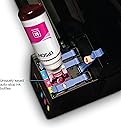
Okay, that headline was a boldfaced lie: Iโm not married. But if I were married and if the grotesque price of ink cartridges threatened that marriage somehow, this printer might save that hypothetical marriage. It comes with two sets of ink bottles which each fully fill up the tanks from empty. When I first filled it there was a little ink left in each bottle, but after it settles and runs the test print I was able to get the rest in. Unlike the Canon Megatank printers which just have a stopper on an open hole to pour ink into, these have a keyed intake and air release. Why is that important? Because it not only prevents spilling ink, it prevents the much worse issue of putting the wrong ink into each tank and forever taunting the printer. I used to work in tech services, and you may be surprised how often that happens. It is a bit larger than I might truthfully want for a printer, but itโs certainly a lot smaller than a color laser printer and a lot cheaper to set up. Since it is an inkjet, you really ought to print something every 2 weeks even if only a single page to keep the ink from drying in the printhead. It does support remote printing, so you can do that from anywhere, even if away from home for an extended period. In terms of print quality, I am quite satisfied. Had I gone with a laser printer, I would not have this high dpi. That and the total setup cost were what pushed me to the Ecotank over laser. Personally, I donโt print that much and any paper I buy will last a long time. If youโre like me, I highly recommend getting a higher weight, higher brightness paper. I use Staples Premium 98 bright, 24lb paper, though any brand of the same will be indistinguishable. If youโre just printing text documents then thatโs probably overkill unless itโs for a customer-facing document for your business. The difference is at once subtle yet definitely noticeable. For pictures I think 20lb paper feels cheap and 92 bright makes a poor canvas. Again, this is aimed at people who are looking primarily for print quality. You canโt judge that properly on crap paper. For those looking for economy and primarily printing, say, school papers, donโt bother with good paper. Good paper can be twice as expensive and you really donโt need it for printing out a recipe or essay or research article.
V**Y
Best printer I've owned
5 years later. Would buy again in a heartbeat, but may never need to. I did my research before buying a printer and this was the easy winner and also recommended by a friend. I do sports card sales and have printed tons of packing slips in the last few years and refilled the ink twice, I think. The process was made easier by the product markings, companion app, and online videos from Epson. Prints have always come out as they should except I've had 2 issues in 5 years with prints that were not a result of what I sent to the printer. Both were resolved by head cleaning which was both diagnosed and handled with a few clicks in the app. I don't recall ever having a paper jam. When I switch to glossy photo paper (which this excels at), it auto-suggests the setting change for me. I've had many printers over the years and almost every one has come up short of minimum expectations until this one. So here's a quick thanks to Epson for building a really good printer.
D**J
Budget color printer
Let me tell you, why you might consider this color printer. Pro: Your color printing cost is low The heads are not going to jammed. The refills are easy to do. It has a scanner, copier and works with smartphones. Con: The print quality is not the best. Make sure the papers are aligned properly. Or it might mess up. Refurbished, does not come with the ethernet cable. /[Power cable only]
N**.
Great printer
This printer is an upgrade to an older Epson that uses cartridges. I did the math and the tank system is so much more affordable. I went with a renewed unit because I know that a unit that is renewed is tested to much more stringent standards and a few minor external scratches mean nothing if it works. I had some problems with the installation software. I am sure it is something on my network or laptop, but after trying everything I knew, I contacted support. They had me do a manual driver install (which I had already done) and were anxious to get me off the line. The printer and scanner work fine, but some functions of the software do not. I love the printer, but their support needs help.
K**.
No more ink problems
The best printer for home use. Clear instructions. Long use of ink. Best printer in its price range. More reliable than well known expensive printers.
R**E
Poor quality product - replaced twice but nothing resolved
I was excited to buy this product, as the ecotank and less waste aspect really appealed to me. The issues happened pretty much right away, unfortunately. First product - After receiving the product, less than a month later the yellow color stopped printing. After contacting customer support, they sent me a replacement (refurbished product). Second product - After a few months, I noticed that when I printed blue (I always print a test paper once a week, as I don't print often) it would not line up properly vertically (see the photo I uploaded for reference). Since this only happened with the blue color, I reasoned that this had to be a hardware issue. I contacted customer support again - this time they were much less helpful. It took multiple calls over a couple of months until they finally agreed to send a replacement. Third product - Same issue with the blue color! And now, I noticed that the yellow color seems to have the same issue, but not the black or red colors. I'm tired of dealing with this issue and Epson's customer support so I'm not going to ask for another replacement. Instead, I'll leave this as a warning to anyone thinking of buying this poorly made product.
S**F
Simple to setup, works perfectly!
I am not a fan of renewed products, but could not pass this one up due to the price. The printer was well packed, came with all the accessories, manuals, CD's and ink it was supposed to. If I did not know this was a refurbished printer, honestly I would have thought it was new. Set it up wirelessly, loaded the ink and paper and in 10 minutes I was printing. The quality of the print is way better than my old HP printer, and the EcoTank means I am no longer wasting $600 + a year on outdated ink cartridges. This printer also has an auto document feeder, automatic dual sided printing, scanning and copying in full color. All this for only $40 more than the EPSON 2720 base model that has none of these features! If you want an EcoTank printer, this is an absolute steal!
J**L
Colors are dull
I had a cheap HP inkjet printer that was sucking ink about as fast as I could by cartridges so I rarely printed anything because of the cost of the inkjet cartridges (a common complaint). This printer appealed to me due to the claim of printing lots of pages with the ecotank ink. I will say I don't have the problems with this printer that I had with the HP. Many times I had to restart the HP to be able to print across my wireless network. I don't have that problem with the Epson 3750. It reliably prints effortlessly without needing any attention from the user. My only complaint about this printer is no matter how I change the settings pictures and graphics print with dull colors. I don't print a lot that needs vivid colors but it would be nice if the colors on this printer weren't so dull. Other than that one complaint I'm pretty happy with this purchase. I bought it refurbished so I got a pretty fair deal on the printer.
Trustpilot
1 month ago
1 month ago