Buy anything from 5,000+ international stores. One checkout price. No surprise fees. Join 2M+ shoppers on Desertcart.
Desertcart purchases this item on your behalf and handles shipping, customs, and support to USA.
🎬 Capture Your Legacy in Stunning HD — Don’t Let Memories Fade!
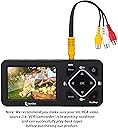
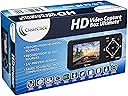
The ClearClick HD Video Capture Box Ultimate is a versatile, user-friendly device designed to convert and stream video from a wide range of sources including HDMI, RCA, VHS, and camcorders. It supports up to 1080p resolution at 60 FPS, records directly to microSD or USB storage (up to 4TB), and offers a built-in 3.5" preview LCD for instant monitoring without a PC. Ideal for professionals and enthusiasts looking to preserve legacy media or stream content with reliable USA-based support and a 1-year warranty.


| Asin | B07MLY17SJ |
| Best Sellers Rank | #172 in Internal TV Tuner & Video Capture Cards |
| Brand | ClearClick |
| Built In Media | Battery |
| Compatible Devices | Speaker |
| Connectivity Technology | HDMI |
| Customer Reviews | 4.2 4.2 out of 5 stars (406) 4.2 out of 5 stars |
| Hard Drive Size | 4 TB |
| Item Weight | 8 Ounces |
| Manufacturer | ClearClick |
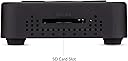
| Media Format Digital Video | Micro SD, SD Card |
| Mfr Part Number | HD Video Capture Box Ultimate |
| Model Number | HD Video Capture Box Ultimate |
| Smart Home Compatibility | Not Smart Home Compatible |
| Upc | 798578763242 |
| Video Input | CVBS, HDMI |
User
Perfect product for digitizing VHS/legacy tapes
Quite rarely do I revisit and write a review for a product after a few years of purchase. The ClearClick HD Video Capture Box Ultimate deserves such a review.I had been infrequently using this product to archive my VHS movie collection. My first batch were low resolution MP4 file. This year I started archiving in HD format and the results are simply fabulous. As I switched from RCA to HDMI input, I noticed signal loss.When I contacted ClearClick, I was pleasantly surprised by their prompt and enthusiastic response. Tyler, the Support lead took charged and walked thru the usual troubleshooting, then tried a few software patch. He even stepped up to replace the product (without having to ask). Finally he went ahead and recommended a specific RCA to HDMI converter ($10 product on amazon) and the results were perfect.In summary, I believe the issue was with the RCA to HDMI convertor which reacted wildly to any change in scene, transition, bad patch in the video tape. The recorder is solid - the HD video and audio is the best I can ask for. And this recorder unit is by far the easiest, most convenient to use. No more computers, converting files, audio/video sync issues. Heck I do not even need TBC and am not sure what to do with some of the advanced VCRs.This is the best support team I have experienced with any of my Amazon purchases. They will not let go till they resolve the problem - in this case, the issue was not even of their product. I highly recommend this product and the team that stands behind it - great work folks!
User
An Excellent Product.
This product is amazing, you know, on previous video transfers, one would have to adjust manifold settings for video compression, sound levels, etc., but this unit does just about everything, at least for video. Now for sound, you should adjust/watch the sound levels (just a bit) and make sure to get a sample of the intended video stream first, but after that, you are good to go. Don't make the mistake of leaving the volume too low, check it first, and do a test recording sample, would be my advice.I think one of the best features of this unit, is the capability to monitor both sound and video input, in the live stream, using the mini-monitor, and built-in mini-speakers.And whomever the engineer was who came up with the integral, rechargeable battery, they should get an award - that is excellent thinking, because the battery helps to maintain a continuous video stream (not to mention, a reliable, steady, voltage supply to the electronics). The battery appears to last between 2 and 3 hours (maybe closer to 2 hours+) but this system is designed to run plugged in, using the battery only for, as I said, any intermittent power fluctuations (that hopefully won't affect your other electronics).This costs a lot, but I think it's definitely worth it. I use this for recording my monitor, for self-auditing purposes, and reviewing data entry, to assure that I am working as efficiently as I can.
User
Nice Device
I have another ClearClick (ClearClick Video to Digital Converter 2.0), which uses RCA connections instead of HDMI. So I wanted to see if this model would be a better option for me. I had expected it to be the same as far as setup and basic usage, but it's different as it's more geared toward live presentations and short recordings, because unlike the other unit, this one has a built in battery. And if that runs low - even when connected to a power source - it will still shut down with not much warning. Granted, I didn't charge it up enough prior to use, but I don't like being a slave to the battery supply if I can help it, and it was disappointing that this unit shut down despite being connected to AC power. I wanted something to record hour-length (or more) videos, something I could leave alone to record without babysitting it for too long. This one didn't cut it for me.That said, the picture quality and sound is fantastic, much better than the other ClearClick I have. Keep in mind that the file size for 20 minutes of video (mp4) is around 4gb.Another nice feature is that it does have an input for RCA cables, if needed, but they all feed into one small, combined jack (cable included).
User
Good Recording Quality
First, I got this for posting videogame tutorial videos online and it works good for that.Pros and Cons: Cons FirstCons:1. Wired microphone/headset only. So bluetooth will not work.2. Remote control - sometimes I need to push the button twice to start/stop/pause recording. Not a big issue as I know to expect this, and watch for it.3. SD card port is really tight. I have to use my multitool pliers to remove the SD card when I use one. Fortunately, I use the USB instead.4. There is no true "passthrough". By that, I mean, If I am playing a game, even if I am not recording, I have to have the device turned on in order to see the game on my TV. This is not good as I have had devices in the past with a passive passthrough. I only had to turn the device on when I wanted to record/watch a video.Pros:1. Excellent picture quality on videos and photos.2. I use USB - insert and removal is easy.3. Because of USB, I can transfer the video/photo files over to my tablet for voiceover/narration of videos.4. Customer service is quick to respond. I contacted them on their website and inquired about which mic/headset they recommend for their product and got a reply back that day with the information.
User
Underwhelmed for 200 bucks
I feel like for 200 bucks this DVR is missing features for such a premium price. That said, I am keeping it because of these PROS: the video quality is top notch (and even has 5 different video quality settings) so I will trust it to encode older media from VHS, old 8mm camcorder etc. that I want to preserve at maximum quality. The other PRO is I like the idea of scheduling a timer recording and just ticking the day of the week. That works for my use case (theres a show I like that comes on Thurs & Fri starting same time). If you want to record shows that occur at different start times then bear in mind this probably won't work for your use case (you get one start time, but can tick multiple days). So I guess those 2 qualities justify me keeping it. For my CONS: I wanted to full-time connect the HDMI-out to my TV (I have a different AV input I can switch to) so I could access the Menu controls on a big screen using the remote, but the HDMI-out doesn't seem to stay on like that, it takes some tinkering (unplug, replug, hit a few buttons etc.) The 2nd CON, how in the world does it not have an option to delete a video????? Lets say I was test recording something and didn't want to keep it, and/or I watched some TV program and now want to delete it. In the Playback mode what SHOULD be implemented is Menu button pulls up a context-sensitive menu, with a DELETE option. That is such a basic feature and I've tried all sorts of DVRs: RipRoar Video Free (favorite), SanDisk Vmate (second favorite), Teon Pav, Mustek PVR-H140 & PVR-A1, Archos, EZCap, iRecord, iConvert etc. etc. - most of those I mentioned allow you to delete a video that you don't want. I really don't care to pull out the SD card each time just so I can delete a file under Windows with a USB card reader, nor attach the ClearClick itself via USB each time. I'm not even asking for a fancy File Explorer with folder view and copy/paste etc., I simply want to DELETE a file. If ClearClick is listening put that on your feature request for the next firmware update.
User
Far better than using Legacy Box
With this device, I was able to record the raw video off my compact VCR tapes and get it into MP4 format. I'm sure Legacy Box or other similar services would do at least that.But, once I got them all converted to MP4 format, I was able to edit them in Adobe Premiere Elements, adding titles, special graphics, special effects, etc. That's a personal and stylistic matter which differs with each recording. That's not something that a converting service would provide.I had 77 compact cartridges. (See photo) That would have cost upwards of $2000.00 for a converting service. For one-tenth the outlay, I was able to ensure that I didn't lose these recordings. The tapes had deteriorated somewhat due to being stored in a hot/cold attic for as much as 30 years. The VCR player had some difficulty with the oldest ones as expected. But, the Video Capture Box was able to handle what was provided.User interface is simple. Be sure, however, that you have the date feature in the proper mode. If you have it on, it will write current date/time onto a recording that might be years old. You'll probably want that feature turned off.If you've got old aging VCR tapes, this is the solution.
User
Aweful. Terrible quality.
Cons: There's plenty.1) If you plan on recording more than an hour's worth at a time, this recorder will split up your video files in one hour segments, and you lose some frames between every split. You HAVE to use an editing program to join the two or more video files back together. Annoying.2) The audio is super low quality, and low in volume. Even at the highest recording quality, the audio sounds terribly compressed and bad. You get a constant hissing/noise from even the best recording option.3) Speaking of the highest recording quality, it's garbage too. There are too many codec glitches going on. Huge blocks of the footage will start to glitch for a split second or two.4) You have no control at what frame rate you can record to. It's all 60fps.5) The charging cable is very proprietary. You cannot just pickup a USB style AC adapter and use it.Pros:1) I do like the idea of a battery in it. It falls roughly to 66% after an hour or so, so it doesn't last long.2) Removable SDHC card selection is nice.3) The on-board screen is nice.4) The build quality is actually sturdy, and feels nice in your hand.FInal Thoughts:1) Someone here on the customer reviews said it was "meant for a professional", which is absolutely NOT TRUE. If you want to see what is really "professional", go get an Atomos and see what is really designed for professional use. If you want to use this for paid work, I as a client would be upset at the quality of the final product. Even if you were just sending the recording straight to the customer, this isn't even suitable for a final deliverable codec. So don't expect to do any recordings and try to edit and color correct the footage.Do yourself a favor, and save up for a Atomos which would give you 10x better quality.
User
Confusing to figure out, but worth the trouble. It works!
I gave this five stars because the end result is good and once you figure it out, it’s easy to use. But initially it was very confusing to figure out and I had to buy the part to bypass protection on the homemade DVDs. The instructions were not clear at all but I fuss with it enough until I finally figured it out. First I got a picture with no sound and when I was almost ready to return it, I thought to try one more thing and it worked. I’m clearly going to have to label how I did this so I can remember for the future! But yes, if you want an affordable way to move from DVD to flash, This is it. I haven’t tried copying from other media yet but I’m sure it won’t be a problem because all I have to do is change the port to whatever output I’m using.
User
Très satisfaite
J'adore! Je l'utilise surtout pour enregistrer des films à partir de l'ordinateur et d'un vhs. Très simple à utiliser sans même lire le guide. Très satisfaite de mon achat.
User
Great quality recording
I have purchased this device for capturing old movies VHS etc and the quality is great. Unfortunately if videos have text with solid color backgrounds it doesnt like it and goes to a blue screen temporarily. Also when you capture via RCA (analogue) you cant capture in 16:9 (widescreen) i dont know why but really annoying that you have to convert in post afterwards. For straight analogue recording of home movies in 4:3 ABSOLUTELY BRILLIANT.
User
Fantastic
Fantastic for the price
User
Besoin d'aide pour retourner
Je n'ai pas pu utiliser car ne répond pas à mes besoins et je n'ai pas pu retourner non plus
User
Horrible Video Quality
There is no way to change the video quality. The "video quality" button on the remote just opens up a menu that lets you choose the resolution (HD or SD). You get a measly 4mbps for SD video, which is WAY too low to retain reasonable picture quality.I was hoping to replace my cheap $20 VCR to USB dongle to untether me from a computer, but it worked infinitely better than this and the quality was near perfect.The screen's backlight is bad and each eye gets a different amount of brightness, so you feel like you're looking into a hologram. Your 4:3 SD footage is going to be stretched to wide to 16:9 on the display for no reason, with no way of seeing it in it's proper un-stretched form.The menu lacks the most basic of settings. No way to change de-interlacing mode. Seems like it's discarding and outputting each field as it's own frame to get 59.94 fps.I cannot recommend this device to anyone for use under any circumstances for the price.
Trustpilot
2 months ago
3 weeks ago