Buy anything from 5,000+ international stores. One checkout price. No surprise fees. Join 2M+ shoppers on Desertcart.
Desertcart purchases this item on your behalf and handles shipping, customs, and support to USA.
๐ Power up your home network โ never miss a beat or a stream!
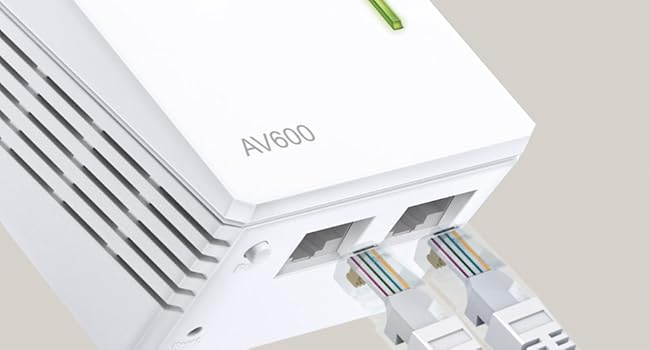
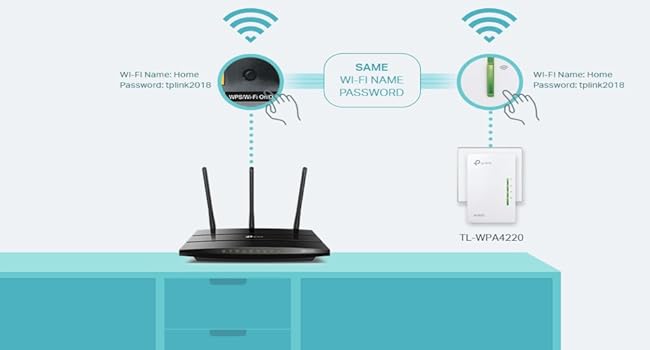
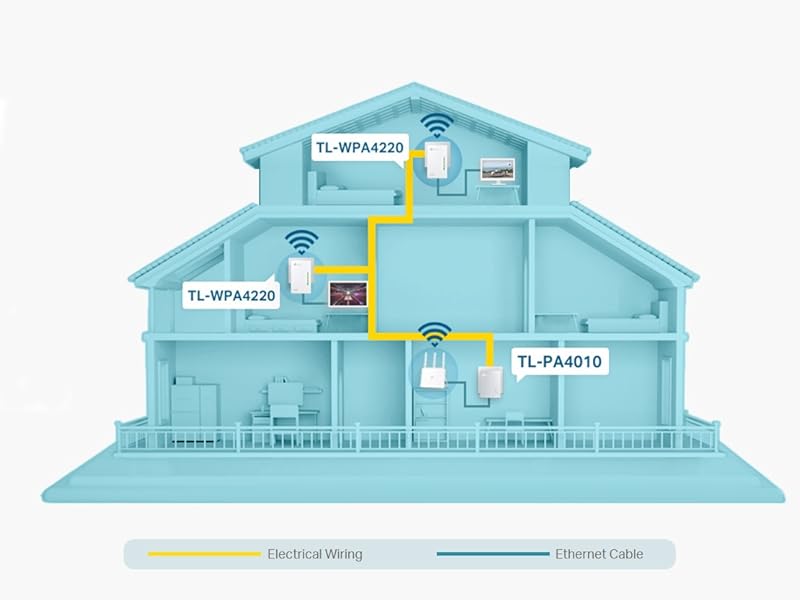
The TP-Link TL-WPA4220 TKIT is a powerful powerline adapter starter kit delivering up to 600Mbps over your homeโs electrical wiring, complemented by a 300Mbps WiFi extender and dual Ethernet ports. Designed for easy one-touch setup and app management, it extends reliable wired and wireless connectivity to hard-to-reach areas, ideal for UHD streaming, gaming, and smart home devices.


| ASIN | B07N1HDMFR |
| Best Sellers Rank | 1,763 in Computers & Accessories ( See Top 100 in Computers & Accessories ) 9 in Powerline Network Adapters |
| Box Contents | 3ร 6.5 ft. (2 m) Ethernet cable (RJ45), Powerline Ethernet Adapter 2ร TL-WPA4220 & 1ร TL-PA4010, Quick installation guide |
| Brand | TP-Link |
| Brand Name | TP-Link |
| Color | White |
| Colour | White |
| Compatible Devices | Desktop |
| Compatible Operating System Family | Linux, Windows |
| Compatible devices | Desktop |
| Country of Origin | China |
| Customer Reviews | 4.2 out of 5 stars 5,027 Reviews |
| Data Link Protocol | Ethernet |
| Data Transfer Rate | 300 Megabits Per Second |
| Data link protocol | Ethernet |
| Hardware Interface | Ethernet |
| Hardware interface | Ethernet |
| Item Dimensions L x W x H | 5.4L x 4W x 9.4H centimetres |
| Item Type Name | 2-Port Powerline Adapter WiFi 3-pack Kit, , Range Extender, Broadband/WiFi Extender, WiFi Booster/Hotspot |
| Manufacturer | TP-Link |
| Manufacturer Part Number | TL-WPA4220 TKIT |
| Model Number | TL-WPA4220T KIT |
| Product Warranty | Manufacturer's 3 Years Warranty |
| Product dimensions | 5.4L x 4W x 9.4H centimetres |
M**Y
Almost boxed it up for a return. Glad I didn't!
UPDATE: After using this wonderful piece of kit now for several days, I can truly say - it is more than magnificent at what it does. Despite owning the title of 'grumpy, moany old man, I simply cannot find fault in this incredible bit of kit. I am so happy that I can watch smart TV, listen to my iPod Touch through my B&W speaker, use my iPad, my MacBook, heck, even my android phone hits in to it. I even tried it at the end of the very long garden just because I could and heck, I have a full on signal. I am simply over joyed 'Sometimes on a review you kind of feel excited and don't actually know where to start. On the one hand I find 'War & Peace' reviews about as helpful as the proverbial chocolate teapot; although, I have see some nice ones. I digress, so here it goes FWIW. This was a case of third time lucky. I'd purchased and returned two of the so-called things that plug in to a socket , press the WPS button while pressing the button on the router and job done. Sadly my new build cottage is protected by kingpin insulation lined on both sides with foil. No wifi is getting through it. I was on the cusp of giving up when I stumbled on this offering from TP-Link. Once I got my thick head around the fact it does not bounce a signal through wifi I was home and dry. Setting up is a breeze. I plugged in the ethernet cable to the smallest unit and it had a 'chat' with my router and set itself up. Then I plugged in the bigger unit, switched it on (don't press pair). And sorted; I thought all was good. All I wanted to do was use my iPod Touch to play music through a Bowers and Wilkins A7 in my den which is about thirty metres from my cottage. Nothing! Totally useless. Speaker I had plugged into the ethernet and into the unit; no worries light stopped flashing on my B&W unit. Turned on the iPod and nothing, it so would not pick up. In the box it all went while I went off to do other things, in a huff. Then I wondered. No good following the instructions, useless. Fine if you just want to power ups a TV or similar. Once you want to stream music or use an iPod there is something you NEED to do. Go into your iPod wifi settings and wait until you see the TP link highlighted. Click on it and enter the password which is handily printed on top of the TP Link unit. All went well. Choose music, hit the A7 speaker and voila, perfect signal. Been listening to my music all afternoon without dropping once. I now fully understand how these things work. I used the smaller unit as mentioned plugged into my router and only one of the two larger units. I suppose should I wish to use a TV in my shed or garage, I will use the second unit. I cannot tell you how pleased I am. JUST be sure if you have issues to look on your TV, speaker or whatever if it asks to join your TP Link unit. Enter th password and you really are JOB DONE! I got there for under ยฃ100.
T**D
Great
Great easy to set up, and use powerline wifi externer. Used to extend wifi capability in barn conversion where foil backed wall insulation was stopping signal. Works a treat. Not super fast but getting between 56 and 66 maps more than enough for our use. Un-intrusive design and at a great price point when I bought.
P**L
Wpa 4220 kit
Replacement for my prev WPA kit that was old and โend of lifeโ ! Easy to set up via WPS and pairing. I get a WiFi speed of about 35 mbps down and 15 mbps up which is about half of what my router produces but it is enough for me for all my streaming and wifi devices. Ethernet to TV works well no streaming issues. Good to have 2 extenders. I managed to do a firmware update via the tp-link app which I have never done before in case it went wrong. But it was easy. The firmware on the adapter and just one extender was applied , then I had to apply the upgrade again to the 2nd extender. Not sure why this is but everything was ok. So overall happy with this. Smaller and more compact than the old kit - which is good. Installation was easy and it worked. Reasonable price. Not as fast as advertised (in my set up)
J**.
Worked brilliantly and simply for me. Problems with connection by WiFi by solved in minutes.
I have a theoretical wifi connection of 78Mbps by my router. It has always given an acceptable but low sometimes connection. Issues arrived with daughter working from home so she had to use with a long ethernet cable trailing through the house waiting for someone to trip over. Friend always been telling me to give powerline. So I thought it may be worth giving it a try. My expectations were. Cheap price. Also I didn't know if the wiring of my house was ok. So I gave this a go. Simple instructions but I was still doubtful if adapter would connect to router. But the required lights came on very quickly. Put the first of the two adaptors in daughters room. Followed simple instructions to connect. Worked like a treat. Her connection from router was steady 68-70Mbps from a potential 78Mbps from router. She could now, and has, workerd from home with no issues whatsoever. I tried the second adaptor on my desktop pc in my converted garage. Had exactly the same connection of 68-70Mbps. My daughter has always complained about connection to fireststick. She says that has very much improved. This could be because of wifi booster. No other explainable reason. The router i have is an ac but I am not sure if it boosts with this equipment in 2.4 and 5ghz or just 2.4ghz. All I can say is wifi has been improved upstairs. I rate at 5/5 for how it worked for me. It is a cheap set of kit but gives brilliant performance for me. I will always stick with powerline connections now in areas I can. The suppied ethernet net cables are only one metre long. If this is too short for you you can buy longer at least as good quality one for ยฃ5-6. Do I recommend it? I never do on products. All I can say it has worked brilliantly for me.
D**9
Great WiFi booster, but you may need a faster connection.
EDIT - I got this device to link my router to my living room to boost speed a reliability after going down the IPTV route. I used to run on an older powerline adapter so I already have e a baseline to go from. With that in mind, although this one had the same specs as the old one, I am having some buffing issues. The older devices died as they have been run into the ground. So running smart tv apps such as Plex, Netflix, and IPSmarters, I've been getting different results. Sony Bravia 4k - CAT6 connection. Plex has a 90% success rate. Netflix has a 100% success rate. IPSmarters 65% success rate. With my older set-up that died in the same network under the same conditions... Sony Bravia 4k - CAT6 connection. Plex 100% success rate. Netflix 100% success rate. IPSmarters 75% success rate. On the other hand, the WiFi works extremely well, much better than the older adaptors. So, value for money, yes, but if you are going down the Internet TV route you may wish for a little more "oomph". If you're just watching Netflix and want to boost your WiFi, then this is great value for money. EDIT - So... it's a year later. Have my thoughts on this changed? YES. I'm looking for some more. I need more speed. Over time, the buffing seems to have got worse and now Netflix is playing up. Maybe something changes when they started limiting accounts and offering cheaper packages with adverts. IPTV is buffing... Netflix is buffing... and if I still played Halo online, Master Chef would be glitching. I have dropped this down a star. And the search for another set has begun.
M**S
So amazing! Great signal quality and easy to set up. Wifi and ethernet connections
So I've had wifi woes since a floor fitter chopped in half an ethernet cable that ran the length of the house. I was considering various options like running cables up the outside of the building, etc. but eventually after reading tons of reviews I opted for this solution. It's AWESOME. CAUTION: We are lucky enough to be in a detached house so we know that the power rings are all ours - I have heard of problems before in semi-detached houses or flats with shared power rings but I can't really comment. My experience relates purely to a detached house. Installation was so easy: Plug the power-link hub device into a wall socket near my router Plug the ethernet cable from router to power-link hub Take one of the extender units and plug it into a wall socket elsewhere in the house (home office, in my case) Press the sync button on the hub and then on the extender and watch them link up (took mine about 5 seconds) At this point you now have an ethernet port in your new location. Repeat for the second extender (we put ours at the top of the house, 3 floors) Now you can connect to the web interface of the extender and change the wifi settings - making the network name and password the same as your standard internet connection means devices will seamlessly move between areas keeping strong wifi. The Wifi connection is 400mbs which is pretty fast, unfortunately the wired connection is only 100mbs (but there is a gigabit version, different product) but it is rock-solid. I have had to restart the extenders a couple of times to re-sync them which is a bit of a pain but compared to running network cables everywhere it's better. NOTE: I did first try another manufacturer's wifi-booster device which simply takes your existing wifi network and repeats it and it was massively lacking - if you have a large house and need a wifi hotspot creating, THIS is the product for you - it has transformed my working-from-home life :-) Highly recommended!
M**N
Brilliant When It Works. But Unusable Due To Catastrophic Unreliability.
Would love to give this a five-star review. Great price, cinch to set up, provides ethernet coverage perfectly too and seamlessly extends your WiFi coverage without all that unreliable extender nonsense. But it has ultimately done nothing but frustrate and outright annoy me. Several times a day, the Powerline part loses sync with the master controller, dropping all internet access from the extenders but leaving WiFi working, thus leaving all devices happily connected but with no internet. On average this lasts a couple of minutes at a time and happens across all extenders. Sometimes it will do it several times inside an hour - I have to use WiFi calling in my house due to very poor network coverage. I have people on my call list I've called back 8-10 times in a single call! It cannot be relied upon in the slightest. As usual, switching the extender on and off resolves the problem instantly but by then it's too late, any call you're on, etc., is already dead and your blood pressure is rising. I've ensured all extenders are plugged into the same house circuit and the TPplc app reports good connectivity everywhere. I've searched for firmware updates (there are none) but all I've found is a litany of people reporting the same problems. Lesson learned: do your research. It's a bargain price but you sadly get something that is ultimately highly unreliable and thus unusable long term. It is not fit for purpose. I can only give it one star at best. I'm just going to have to swallow the loss and upgrade to one of the more expensive, higher-performing systems. And I won't be upgrading to a TP-Link one as I cannot trust their products any more. A shame because, as I said, when it works, it's seamless and fast.
J**N
Easy to install
Easy to install and works well. Very pleased
Trustpilot
1 week ago
4 days ago